How to Screen Resumes in Bulk: A Recruiter's Guide (2026)
One open role. Three hundred resumes in the inbox by Friday. If you are a recruiter, you already know the math does not work: reading each one for even two minutes is ten hours of staring at PDFs, and by resume 200 you are not really reading anymore. Bulk resume screening is how you fix that. Instead of opening files one by one, you upload the whole stack at once, rank every candidate against the job description, and spend your time on the people most likely to be a fit.
Quick answer
Why one-by-one resume review breaks at scale
The problem is not that recruiters are slow. It is that manual review scales linearly: twice the applicants means twice the hours. Popular roles now routinely pull hundreds of applications in the first few days, so the honest outcome of one-by-one review is that most resumes get a five-second glance or no read at all. Strong candidates get missed not because they were weak, but because they were resume number 187.
Manual review is also inconsistent. The criteria you apply to the first resume of the morning are not the criteria you apply to the last one before lunch. Bulk screening flips both problems: the time you spend stops scaling with the size of the pile, and every candidate is measured against the same job description on the same criteria.
Screening is ranking, not rejecting
How to screen resumes in bulk, step by step
The fastest, most consistent way is to let a tool do the first pass the same way an applicant tracking system reads resumes, then review the ranked result yourself. Here is the full process.
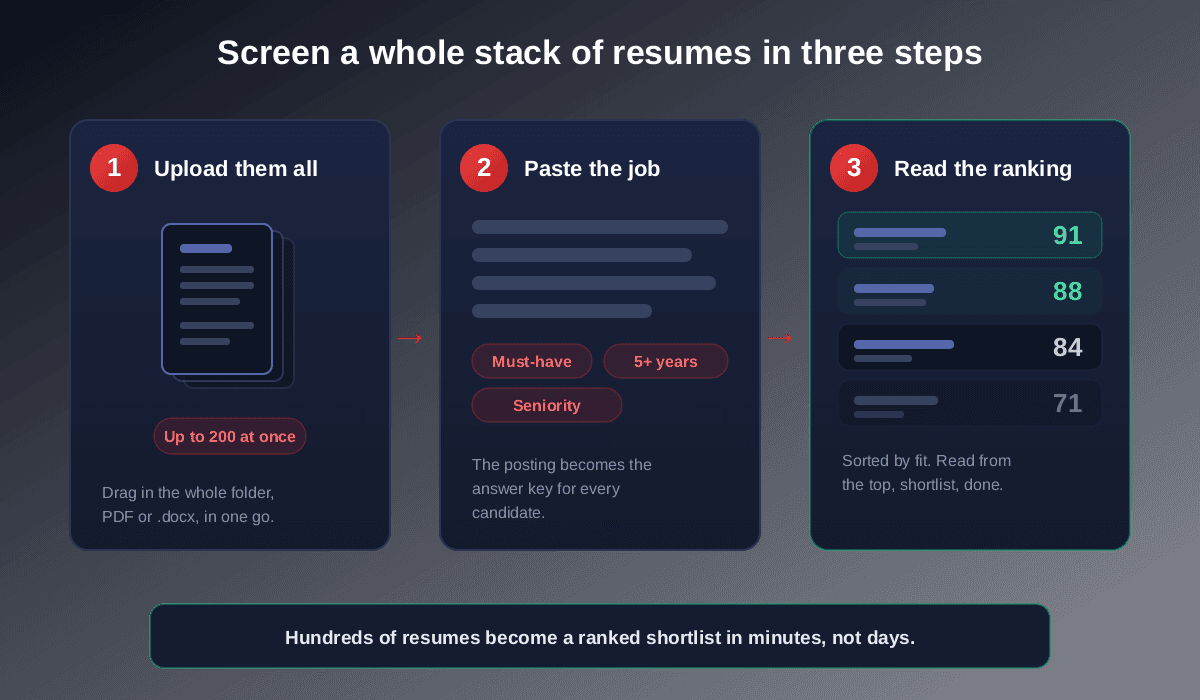
Upload the whole stack at once
Drag in every resume for the role together, a folder of PDFs and .docx files in one go, instead of opening them individually. A bulk screening tool is built to process the whole batch in a single pass. With Rankid you can upload up to 200 resumes per batch.
Paste the job description as the answer key
Paste the full posting once, not just the title. The skills, tools, seniority, and years of experience it names become the criteria every candidate is scored against. The more complete the description, the sharper the ranking, because the tool knows exactly what a strong match looks like for this specific role.
Read candidates ranked by match score
You get every resume scored 0 to 100 and sorted highest to lowest, each with the keywords and skills it matches and the ones it is missing. Start at the top, work down, and stop when your shortlist is full. The candidates most likely to fit are now the first ones you see, not the ones buried at the bottom of the inbox.
Review the borderline scores with judgment
Scores cluster: a clear top tier, a clear bottom, and a middle band worth a human look. Skim the middle for transferable experience or skills phrased differently from the posting. This is where recruiter judgment adds the most value, and where a tool should inform you, never decide for you.
Screen a batch of resumes against one job, free
Upload your resumes and paste the job description into Rankid. You'll get every candidate ranked 0 to 100 by fit, with the skills and keywords each one matches and misses, so you can shortlist in minutes instead of days. Your first 5 resumes are free, no signup needed.
Screen resumes in bulk freeWhat a bulk screening tool actually scores
When it ranks a batch against a job description, the tool is comparing the same four things a recruiter scans for, just consistently across every candidate at once:
- Hard skills and tools. The specific technologies, software, methods, and certifications named in the posting, matched against each resume.
- Keywords and phrasing. Whether the candidate uses the language the posting does. This is the same mechanic candidates worry about in our resume keywords guide, seen from the hiring side.
- Job title and seniority.Whether the candidate's level and titles line up with what the role expects.
- Relevant experience. Whether the background shows the kind and amount of experience the role requires, in a related field.
Each candidate's score is a single summary of that fit. Because it mirrors how AI resume screening works on nearly every application, ranking your batch this way re-creates the real screen, but in your control and in minutes.
Bulk screening vs your ATS: what is the difference?
They solve different problems and work well together. Your applicant tracking system stores candidates and moves them through your pipeline, and many filter on keywords. What most do not give you is a clean, ranked match for every applicant against one specific posting. A bulk screening tool focuses on exactly that scoring step: it parses each resume the way an ATS does, compares it to the job description, and ranks the whole batch by fit.
In practice you use both. The ATS is your system of record; the screening tool tells you who in that record to look at first for this role. If you are curious how the parsing side affects results, the candidate-facing version of that story is in how to make an ATS-friendly resume.
Bulk screening mistakes that cost you good candidates
Bulk screening is powerful, which means a careless setup can filter out people you wanted. Avoid these:
- Auto-rejecting on raw score. Never silently discard the bottom of the list. Rank to prioritize, then have a human decide. Strong people with transferable experience often land in the middle band.
- A thin job description. If you paste a two-line posting, the tool has little to score against. Give it the full set of requirements so the ranking means something.
- Screening on nice-to-haves. Weight the must-have skills. Penalizing candidates for missing an optional tool buries qualified people.
- Never reading the middle. The top tier is easy and the bottom is usually right, but the borderline scores are where recruiter judgment earns its keep.
Keep a human in the loop
How much time bulk screening actually saves
The saving compounds with volume. At roughly two minutes per resume, 300 applicants is about ten hours of reading. Bulk screening turns that first pass into a few minutes of processing plus focused review of a ranked shortlist, usually well under an hour to reach a confident top ten. The bigger the pile, the larger the gap, which is exactly why high-applicant roles are where bulk screening pays off most.
Key takeaways
- Bulk resume screening means uploading every resume at once and ranking each candidate against one job description.
- You get every applicant scored 0 to 100 by fit, with the keywords each one matches and misses.
- It scores hard skills, keywords, seniority, and relevant experience, the same things a recruiter scans for.
- Use it to decide who to read first, not to auto-reject; keep a human on the final call.
- Rankid screens up to 200 resumes per batch, and your first 5 are free with no signup.
Bottom line: when the applications outnumber the hours, do not read faster, screen smarter. Upload the stack, rank everyone against the job description, and spend your attention where it matters. Run your next batch through Rankid's free bulk resume screening and turn a wall of resumes into a ranked shortlist in minutes.
Frequently asked questions
How do recruiters screen resumes in bulk?
They stop reading resumes one at a time and let software do the first pass. The recruiter uploads every resume for the role at once, pastes in the job description, and the tool scores and ranks each candidate by how well they match the required skills, keywords, and experience. The recruiter then reviews the ranked shortlist from the top down, which turns hundreds of resumes into a few hours of focused work. With a tool like Rankid you can screen up to 200 resumes in a single batch.
What is the fastest way to screen hundreds of resumes?
Bulk screening against a single job description. Instead of opening each file, you upload the whole stack, give the tool the job posting as the answer key, and it returns every candidate ranked 0 to 100 by fit. You read in priority order and stop when your shortlist is full, so the time you spend no longer scales with the size of the pile.
Is bulk resume screening accurate?
It is accurate at what it is meant to do: surface the candidates who most clearly match the role's stated requirements so a human reviews them first. It does not replace recruiter judgment, it orders the queue. Because every resume is scored against the same job description on the same criteria, it is also more consistent than a tired human reading resume number 240 differently from number 2.
Can I upload multiple resumes at once to screen them?
Yes. A bulk screening tool is built for exactly this. You drag in a folder of PDFs or .docx files, paste the job description once, and it processes the whole batch together. Rankid lets you screen up to 200 resumes in a single batch, and your first 5 are free with no signup.
How is bulk resume screening different from an ATS?
An applicant tracking system stores and tracks applicants through your pipeline; many filter on keywords but do not give you a true ranked match for each candidate against a specific job. A bulk screening tool focuses on the scoring step: it reads every resume the way an ATS parses it, compares it to the job description, and ranks the whole batch by fit. You can use it alongside your ATS to decide who to look at first.
Does bulk screening reject candidates automatically?
It should not, and good practice is that it does not. The tool ranks and scores, then a recruiter decides. Auto-rejecting on a raw score risks dropping strong people who phrased things differently or have transferable experience. Use the ranking to prioritize who you read first, not to silently discard the bottom of the list.
Is there a free way to screen resumes in bulk?
Yes. Rankid lets you screen a batch of resumes against a job description for free, with no signup required for your first 5 resumes. You upload the files, paste the posting, and instantly see every candidate ranked by match score with the keywords each one covers and misses.