PDF vs Word Resume: Which File Format Is Best for ATS in 2026?
"Should my resume be a PDF or a Word document?" is one of the most searched resume questions there is, and most of the answers floating around are half right at best. Some blogs swear PDFs get silently rejected by the software. Others insist Word is outdated. Both are oversimplified, and following the wrong one can quietly cost you interviews. This guide gives you the clear, current answer for 2026: when a PDF is the right call, when Word is safer, the one format mistake that gets resumes rejected in every extension, and how to confirm your file actually parses before you apply. Get this right and you stop worrying about the file and start competing on what is inside it.
Quick answer
The short answer: PDF or Word?
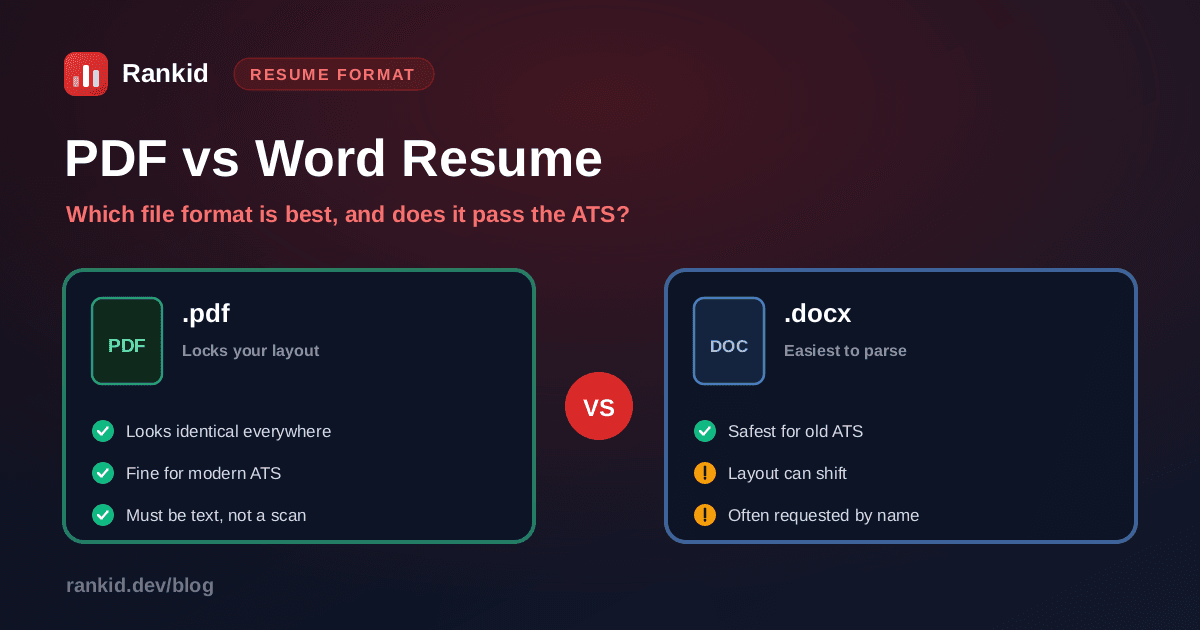
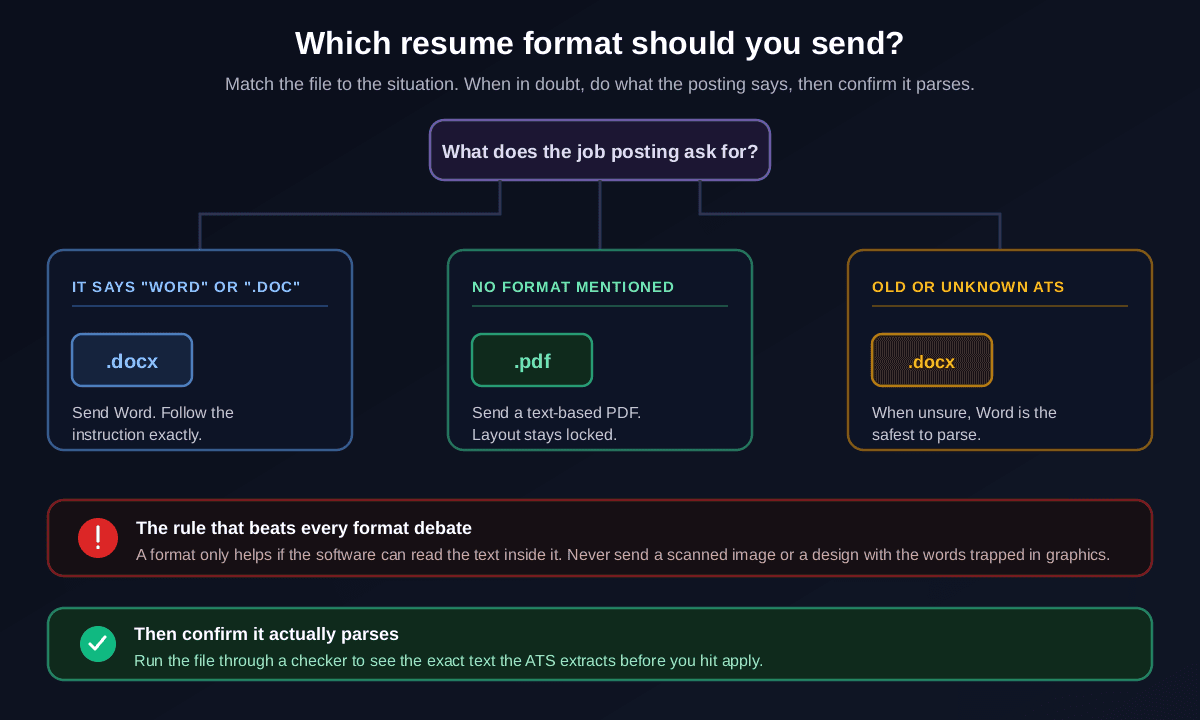
If you want one sentence: send a text-based PDF unless the posting asks for Word, and send Word whenever it does.A PDF keeps your formatting identical on every screen and printout, and today's major applicant tracking systems parse standard PDFs without trouble. Word wins in the specific cases where the employer's system or process expects it, which they will usually tell you. Everything else is detail on top of that rule.
The reason this question feels confusing is that the honest answer is conditional, and a lot of advice tries to force it into an absolute. "PDF is always best" ignores the employers who explicitly want Word. "Word is safest" ignores that a well-made PDF preserves the layout you carefully built and is read cleanly almost everywhere in 2026. The useful version depends on what the posting says and what system is on the other side, so let us make it a simple decision instead of a debate.
When a PDF is the right choice
A PDF is the strongest default for online applications where no format is specified, and its biggest advantage is control. The layout you see is exactly the layout the recruiter sees: fonts, spacing, bullets, and section breaks stay put whether the file is opened on a phone, a laptop, or a printer. A Word document can reflow and shift depending on the reader's version, fonts, and settings, so a resume that looked perfect on your machine can arrive with broken spacing on theirs. PDF removes that risk.
The catch, and the source of the whole "PDFs get rejected" myth, is that not all PDFs are equal. A PDF exported as selectable text parses fine. A PDF that is really a scanned or flattened image of your resume has no readable text at all, so the parser extracts nothing and you look like a blank application. Design-tool exports that bake your words into graphics cause the same failure. So a PDF is an excellent choice, as long as it is a text-based PDF, which is exactly what you get when you build a normal document and export it properly.
The 5-second PDF test
When Word (.docx) is the safer bet
Word is the safest, most universally parseable format, and there are three clear situations where it beats a PDF. First and most important: when the posting or recruiter explicitly asks for it. An instruction to submit a Word document is not a suggestion, it is telling you what their system expects, and sending a PDF instead makes you look like you did not read the requirements.
Second, when a recruiter or staffing agency will handle your resume, they often want Word so they can edit it, add their header, or reformat it before passing it to a client. Third, when you are applying through an older or unknown applicant tracking systemand cannot tell what it prefers, .docx is the format least likely to trip up an outdated parser. The trade-off is the one mentioned above: a Word file can reflow on someone else's setup, so your careful spacing is slightly less guaranteed than in a PDF. In the situations above, that trade is worth it.
Follow the instruction, every time
The mistake that rejects resumes in every format
Here is the part most PDF-versus-Word debates completely miss. The extension is rarely what gets a resume rejected. What gets it rejected is that the applicant tracking system cannot read the text, and that can happen in a PDF or a Word file. If the parser cannot extract your words, it does not matter whether the file ends in .pdf or .docx: your skills, titles, and experience simply are not there to be matched.
The usual culprits are the same regardless of format:
- Scanned or image-based files. A resume that was scanned, screenshotted, or exported as a flat image has no selectable text. The ATS sees a picture and extracts nothing.
- Words trapped in graphics, tables, or columns. Heavily designed templates that place text inside shapes, multi-column layouts, headers, footers, or text boxes often parse in the wrong order or drop content entirely.
- Skill bars, icons, and charts.A "Python: 4 of 5 stars" graphic or an icon-based skills grid carries no readable keywords, so the skills silently disappear from the parse.
- Unusual fonts or exotic file types. Non-standard fonts can garble on extraction, and formats like .pages, .rtf, .txt, or image files should never be used for the actual application.
This is why the format question is the wrong thing to obsess over. Picking PDF or Word is a two-minute decision; making sure your resume is clean, single-column, selectable text is what actually determines whether it survives the parse. If you want the full checklist for a parser-friendly file, see our guide to building an ATS-friendly resume, and if you want to be certain, test whether your resume passes the ATS before you send it.
See the exact text the ATS reads from your resume
Stop guessing whether your PDF or Word file parses. Paste your resume and the job description into Rankid and see the text the system actually extracts, plus a 0 to 100 match score and the skills you are matching versus missing. Your first check is free, no signup.
Check your resume freeHow to save your resume the right way
Once you know which format to send, saving it correctly takes a minute. The goal every time is a clean file with real, selectable text and a simple layout. Follow these steps and your resume will parse whether you send PDF or Word.
Keep one editable master document
Build and maintain your resume in an editable source (Word or a comparable editor). This is your master. You will export the right format from it per application, and it makes tailoring the content to each job fast.
Use a single-column, standard layout
Stick to one column, standard fonts, clear section headings, and normal bullet points. Avoid tables, text boxes, multiple columns, headers and footers for key content, and skill-bar graphics, because those are what break the parse in any format.
Export to the format the posting wants
If the job asks for Word, save as .docx. If it asks for PDF, or says nothing, export to PDF using "Save as PDF" or "Export," not by printing to an image or scanning. That produces a text-based PDF with selectable text.
Name the file clearly
Use a clean, professional filename like Firstname-Lastname-Resume.pdf. Avoid vague names like "resume-final-v3.pdf," which look unpolished and are harder for a recruiter to find later.
Confirm it parses before you apply
Do the highlight-and-copy test, then run the file through a checker that shows the extracted text and match score. Checking your resume against the job description confirms both that the format works and that the right keywords are being read.
Formats to avoid entirely
For the actual application, stick to PDF or .docx and avoid everything else. A surprising number of resumes fail for no reason other than the wrong container:
- Images (.jpg, .png, screenshots). Zero readable text. An instant parse failure.
- .pages (Apple Pages). Many systems and recruiters cannot open it. Export to PDF or Word instead.
- Google Docs share links. An application wants a file upload, not a link that may require access or break. Download as PDF or .docx and upload that.
- .txt and .rtf. Plain text throws away all formatting and structure; .rtf is inconsistently parsed. Neither presents well to a human reader.
- Design-tool exports with baked-in text. Beautiful, and often unreadable to a parser. If you use a design template, confirm the exported text is actually selectable.
Why content beats format every time
Here is the reframe that matters most. Choosing PDF or Word correctly stops you from losing on a technicality, but it does not, on its own, win you the interview. Once your file parses cleanly, the decision comes down to whether your resume is a strong match for the specific job: the skills, keywords, titles, and experience the posting is actually looking for. That is where impressions turn into clicks and clicks turn into interviews.
So treat the format as the easy first step, then spend your real effort on the content. Mirror the language of the posting, lead with the keywords the ATS is scanning for, and tailor your resume to the job description so the match is obvious. A perfectly formatted resume aimed at the wrong target still loses to a plainer one that clearly fits the role.
The fastest way to close the loop is to check both at once. Paste your resume and the job posting into Rankid's free resume checker and you will see the exact text the system extracts from your file, a 0 to 100 match score, and the skills you match versus the ones you are missing. That confirms your format works and tells you whether the content is strong enough to get you found, so you fix the real problem instead of second-guessing an extension.
Key takeaways
- Default to a text-based PDF: it locks your layout and modern ATS platforms read it fine.
- Send Word (.docx) when the posting asks for it, when a recruiter will edit your resume, or when the system is old or unknown.
- If the application names a format, use that exact format. That instruction beats every general rule.
- PDFs are not rejected for being PDFs. Files get rejected when the software cannot read the text inside them.
- Never send a scanned image, a design with words trapped in graphics, or exotic types like .pages, .txt, or .jpg.
- Keep one editable master, export the right format per job, and name the file cleanly.
- Confirm the file parses with the highlight-and-copy test, then check the extracted text and match score with Rankid before you apply.
The PDF-versus-Word question is worth answering once and then never worrying about again. Send a text-based PDF by default, switch to Word when the posting or system calls for it, and make sure the text inside is readable no matter which you pick. Then move on to the part that actually decides your outcome: whether your resume matches the job. If you want to see exactly how your file reads and scores against a specific posting, start with what a good resume match score looks like and check yours free.
Frequently asked questions
Should a resume be a PDF or a Word document?
For most applications in 2026, a text-based PDF is a safe default because it locks your layout so the resume looks the same on every screen and print, and modern applicant tracking systems read PDFs without trouble. The one important exception is when the job posting or recruiter explicitly asks for a Word document (.docx). In that case, always send Word, because they are telling you what their system expects. So the real answer is not 'PDF is always best' or 'Word is always best.' It is: follow the posting's instruction if it gives one, default to a text-based PDF when it does not, and lean toward Word if you know the employer uses an older or unknown system. The format matters far less than one thing that quietly rejects resumes in every format: whether the software can actually read the text inside your file. A scanned image saved as a PDF, or a design with the words trapped inside graphics, will fail no matter which extension it has.
Do PDFs get rejected by applicant tracking systems?
A properly made, text-based PDF is not rejected by modern applicant tracking systems. This is the biggest myth in resume advice. Today's major ATS platforms parse standard PDFs reliably. What does get rejected is a PDF the software cannot read: a resume that was scanned or exported as a flat image so the text is really a picture, a heavily designed template that hides words inside graphics, tables, columns, or text boxes, or a file saved in an unusual way. The problem in those cases is not the PDF extension, it is that there is no readable text for the parser to extract. If you build your resume as a normal document and export it to PDF as selectable text, it parses fine. If you are applying through an older or unknown system, a .docx removes any doubt, which is why it is the safest choice when you are not sure what the employer uses.
Why do some employers ask for a Word document instead of a PDF?
A few reasons. Some older applicant tracking systems and internal tools were built to handle .docx most reliably, so a Word file is the format their parser is happiest with. Recruiters and staffing agencies sometimes ask for Word because they want to edit the resume, for example to add their agency's header or reformat it before sending it to a client. And some hiring workflows simply standardized on Word years ago and never changed. The key point is that when a posting names a format, that instruction beats every general rule of thumb. If they ask for Word, send Word. If they ask for PDF, send PDF. Ignoring an explicit format request is an easy, avoidable reason to look careless before anyone has read a single line of your experience.
What is the best file format for a resume in 2026?
There is no single universal best format, but there is a reliable decision. If the job posting specifies a format, use exactly that. If it does not, a text-based PDF is the strongest default for online applications because it preserves your layout and is read cleanly by modern systems. Reserve .docx for when it is requested, when a recruiter will edit your resume, or when you are applying through an older or unknown ATS and want the safest possible parse. Avoid every other format for the actual application: do not send .pages, Google Docs share links, .txt, .rtf, images like .jpg or .png, or a resume embedded in a design tool export. Whatever you choose, keep the file as clean, selectable text in a simple single-column layout, and confirm it parses before you apply, because a format only helps if the software can read the words inside it.
How do I know if my resume file will pass the ATS?
Do not guess, test it. Two quick checks catch almost every format problem. First, open your file and try to select the text with your cursor and copy it. If you can highlight and copy the words, the text is real and machine-readable. If nothing selects, your resume is an image and the ATS will see nothing. Second, run the file through a resume checker or an ATS test that shows you the exact text it extracts and how well it matches a specific job description. That reveals not just whether the file parses, but whether the right keywords and skills are being read. You can paste your resume and a job posting into Rankid's free resume checker to see the extracted text and a match score, so you confirm both that the format works and that the content lines up before you hit apply.
Should I use the same resume file format every time I apply?
Use the same well-built master resume, but adapt the file format to each application's instructions. Keep your resume in an editable source document (usually Word or a similar editor), then export the right version per job: PDF when no format is specified, .docx when Word is requested or when you are unsure about the system. Keeping an editable master also makes it easy to tailor the content to each posting, which matters far more than the extension. The same clean source can be exported to either format in seconds, so there is no reason to send the wrong one. Match the format to the posting, tailor the content to the role, and verify it parses each time.