How to Compare Multiple Resumes to a Job Description at Once (2026)
One job description. A folder with dozens, maybe hundreds, of resumes in it. The task sounds simple: figure out which candidates actually fit. But the moment you open the second file, you are already comparing it to a memory of the first, and by the tenth the bar has quietly moved. Reading resumes in sequence does not let you compare them, it just lets you skim them. Comparing multiple resumes to a job description means measuring every candidate against the same requirements at the same time, so the strongest fit is obvious instead of buried in the pile.
Quick answer
What it means to compare resumes to a job description
Comparing resumes to a job description is the act of measuring each candidate against the role's stated requirements on the same axes, then placing them next to each other so relative fit is visible. It is not the same as reading. Reading is linear and private to your memory; comparison is parallel and explicit. The output of reading is a vague feeling about a pile. The output of comparison is a table: this candidate covers nine of ten required skills, that one covers six, this one has the seniority but misses the core tool.
The distinction matters because relative fit is the thing you actually hire on. You are almost never asking "is this resume good?" in isolation. You are asking "who, out of everyone who applied, fits this role best?" That question can only be answered by holding candidates against a fixed standard and against each other at once, which is precisely what sequential reading cannot do.
Comparison is a matrix, not a stack
Why comparing resumes by hand breaks down
The problem is not effort, it is that human comparison does not scale past a handful of documents. Two specific failures show up every time a recruiter compares a large batch by reading:
- Criteria drift. The standard you apply to resume 2 is not the standard you apply to resume 80. Fatigue, mood, and the last few resumes you saw all move the bar, so candidates are judged against each other in the order they happened to arrive, not against the job.
- Working-memory limits.You can genuinely hold maybe three or four resumes in your head at once. Beyond that, comparison collapses into a rolling "better or worse than the last one," which is why strong candidates near the bottom of a big stack get missed so often.
Both failures have the same root: you are trying to do a parallel task (compare everyone) with a sequential tool (reading). The fix is not to read faster or to be more disciplined. It is to compare in parallel, which means scoring the whole batch against one fixed set of criteria in a single pass. That is the same shift we describe in how to screen resumes in bulk, applied specifically to the comparison step.
How to compare multiple resumes to a job description, step by step
The fastest and most consistent way is to let a tool do the parsing and matching the way an applicant tracking system reads resumes, then review the side-by-side result yourself. Here is the full process.
Turn the job description into a fixed checklist
Before you compare anything, decide what the role actually depends on. Pull the must-have skills and tools, the seniority level, and the amount of relevant experience out of the posting, and mark which items are non-negotiable versus nice-to-have. This checklist becomes the rows you compare every candidate against. Do it once, up front, so the standard cannot drift halfway through.
Upload every resume together, not one at a time
Drag in the whole folder of PDFs and .docx files in a single go. A bulk comparison tool is built to parse the entire batch at once, so you are never opening files individually. With Rankid you can compare up to 200 resumes against one posting per batch.
Paste the full posting as the answer key
Paste the complete job description once, not just the title. The skills, keywords, seniority and years it names become the criteria every candidate is measured against, so a thin two-line posting gives you a thin comparison. This is the same mechanic candidates worry about from the other side in our resume keywords guide; here you are the one holding the answer key.
Read the side-by-side comparison, top down
You get every resume scored 0 to 100 and lined up against the same requirements, sorted strongest first. Each candidate shows the skills and keywords they match and miss and the relevant experience they bring, so you are comparing on evidence, not on which file you read most recently. Start at the top and work down until your shortlist is full.
Compare the borderline candidates with judgment
Scores usually cluster into a clear top tier, a clear bottom, and a middle band worth a human look. The comparison detail earns its keep here: scan the middle for transferable experience or a required skill phrased differently from the posting. The tool lines the candidates up; you make the call on the close ones.
Compare a whole stack of resumes to one job, free
Upload your resumes and paste the job description into Rankid. You'll get every candidate scored 0 to 100 against the same requirements, with the skills, keywords and relevant experience behind each score, laid out side by side so you can see who fits without opening a file. Your first 5 resumes are free, no signup needed.
Compare resumes freeWhat to compare each resume on
A good comparison holds every candidate against the same four dimensions, the same ones a recruiter scans for, just applied identically across the whole batch instead of drifting from resume to resume:
- Required skills and tools. The specific technologies, methods and certifications named as must-haves, counted as a coverage ratio (nine of ten) rather than a vague impression, so two candidates are compared on the same denominator.
- Keywords and phrasing. Whether the candidate uses the language the posting does. A strong comparison surfaces which posting terms each candidate covers and misses, so a real skill named differently does not silently sink someone.
- Seniority and title fit.Whether each candidate's level lines up with the role, so a senior posting is not topped by a junior profile that got lucky on keywords.
- Relevant experience. Not total years, but years in a field related to the role, so unrelated tenure does not inflate a weak match in one column and outrank a genuinely stronger one.
Each candidate's 0 to 100 score is a single summary of those four dimensions, and a good tool lets you open the score to see what drove it. That is what makes side-by-side comparison defensible: you are not just trusting that 88 beats 71, you can see the exact rows where the 71 fell short.
Comparing vs screening vs shortlisting: how they fit together
These three terms describe one first pass seen from three angles, and it helps to keep them straight. Comparison lines candidates up against the same requirements so you can see relative fit. Screening turns that comparison into a ranked, who-to-read-first order. Shortlisting draws the line and picks the group you actually interview.
In practice a single bulk pass does all three at once: it compares every resume to the job, ranks them by fit, and lets you draw a shortlist where the scores drop off. If you want to go deeper on the later steps, we cover the ranking side in bulk resume analysis and the cut-the-pile side in how to shortlist candidates from resumes. This guide is about the comparison itself: getting every candidate onto the same axes in the first place.
Comparison mistakes that cost you the right hire
Side-by-side comparison is powerful, which means a careless setup can rank the wrong person first. Avoid these:
- Weighting nice-to-haves like must-haves. If an optional tool counts as much as a core skill, a well-rounded generalist can outrank the specialist the role actually needs. Separate the two before you compare.
- Comparing on the score alone. The number is a summary. Two candidates can both score 84 for completely different reasons, so open the breakdown before you decide between close columns.
- Auto-rejecting the bottom. Comparison is for prioritizing who you read, not for silently discarding people. Transferable experience and unusual phrasing often land a strong candidate in the middle of the pack.
- Feeding it a thin posting. A two-line job description gives the comparison almost nothing to measure against. The richer the requirements, the sharper the side-by-side result.
Keep a human on the close calls
How this works alongside your ATS
A comparison tool and an applicant tracking system solve different problems. Your ATS stores candidates and moves them through the pipeline, and many filter on keywords, but most do not give you a clean side-by-side comparison of every applicant against one specific posting. A bulk comparison tool focuses on exactly that: it parses each resume the way an ATS does, matches it to the job description, and hands you the whole batch lined up and scored.
You use both. The ATS is your system of record; the comparison tells you who in that record fits this role best, and why. If you are curious how the parsing that underlies all of this affects results, the candidate-facing version of the story is in how to make an ATS-friendly resume.
How much time side-by-side comparison saves
The saving compounds with volume. At roughly two minutes to fairly read and mentally slot one resume, 150 applicants is about five hours, and that is before the criteria drift forces you to second-guess the early ones. A bulk comparison turns that into a few minutes of processing plus a focused review of a ranked, side-by-side view, usually well under an hour to reach a confident top ten. The bigger the pile, the larger the gap, which is why high-applicant roles are exactly where comparing in parallel pays off most.
Key takeaways
- Comparing resumes to a job description means measuring every candidate against the same fixed requirements at once, not reading them in sequence.
- Reading is sequential and drifts; comparison is parallel and consistent, which is why manual comparison breaks past a handful of resumes.
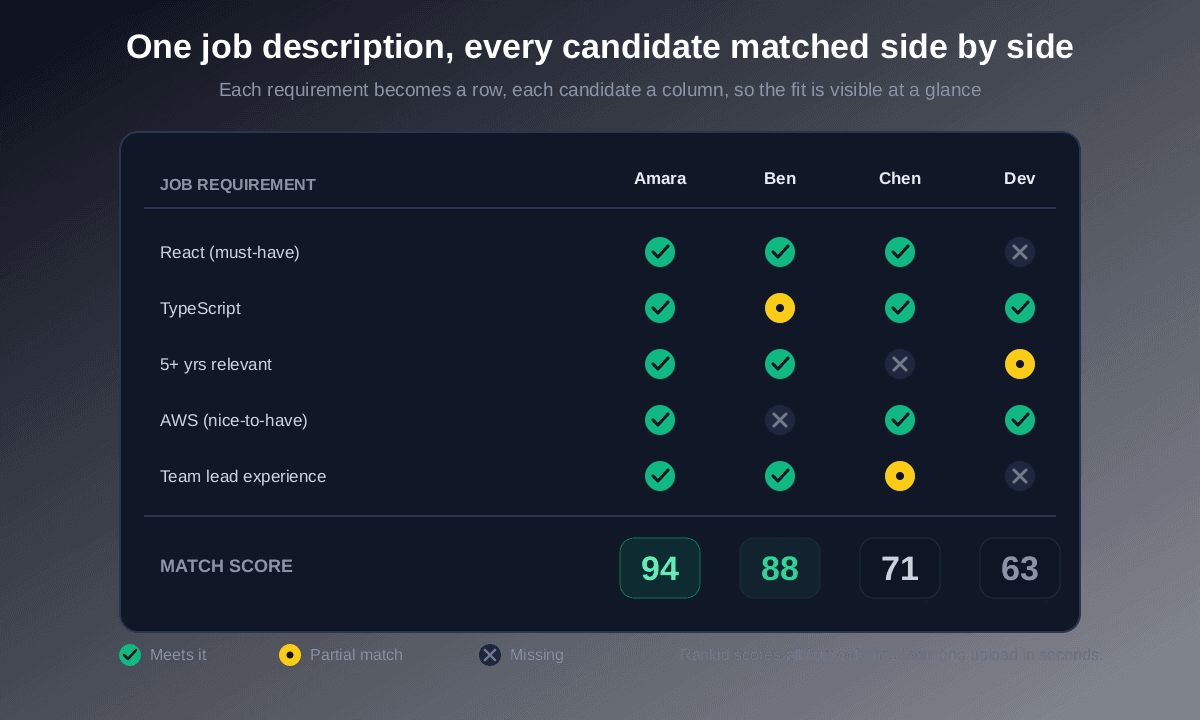
- The cleanest comparison makes the job's requirements the rows and candidates the columns, so gaps are visible at a glance.
- Compare on required skills, keywords, seniority and relevant experience, and separate must-haves from nice-to-haves first.
- Rankid compares up to 200 resumes to one job description per batch, scored side by side, and your first 5 are free with no signup.
Bottom line: when the applications outnumber the hours, do not read the stack, compare it. Put every candidate on the same axes against the job description, let the strongest fit rise to the top, and spend your judgment on the close calls. Run your next batch through Rankid's free bulk resume comparison and turn a folder of resumes into a side-by-side view of who actually fits, in minutes.
Frequently asked questions
How do you compare multiple resumes to a job description?
You stop reading them one at a time and score the whole set against the same criteria at once. Upload every resume for the role together, paste the job description in as the answer key, and a comparison tool parses each candidate and matches them against the required skills, keywords, seniority and relevant experience. It returns every resume scored 0 to 100 and lined up side by side, so instead of holding four documents in your head you read a single comparison where the strongest fit is already at the top. With Rankid you can compare up to 200 resumes against one posting in a single batch.
What is the best way to compare resumes side by side?
On the same fixed criteria, all at once, rather than in sequence. When you read resumes one after another the bar quietly drifts: resume 40 is judged against your memory of resume 2, not against the job. Side-by-side comparison fixes the criteria to the job description and applies them identically to every candidate, so a match on resume 40 counts exactly as much as the same match on resume 2. The cleanest way to do this is a comparison view where requirements are the rows and candidates are the columns, so a gap in any one candidate is visible at a glance.
Can I compare 100 resumes to one job posting at once?
Yes. That is exactly what a bulk comparison tool is built for. You drag in a folder of PDFs or .docx files, paste the posting once, and it compares the entire batch against the same requirements in one pass instead of making you open 100 files. Rankid compares up to 200 resumes to one job description per batch, and your first 5 are free with no signup.
How do you compare candidates fairly and objectively?
Fair comparison comes from applying the same criteria to everyone and from separating must-haves from nice-to-haves before you start. Decide what the role actually depends on, score every candidate against that identical checklist, and treat the score as a summary you can open up rather than a verdict. Because a bulk comparison tool measures candidate 1 and candidate 100 on the same axes, it is more consistent than a human reading a large pile, but you should still read the evidence behind each score and keep the final call with a person.
Is there a free tool to compare resumes to a job description?
Yes. Rankid lets you compare a batch of resumes to one job description for free, with no signup for your first 5 resumes. You upload the files, paste the posting, and instantly get every candidate scored 0 to 100 with the specific skills and keywords each one matches and misses, laid out side by side so you can see who fits without opening a single file.
How is comparing resumes different from screening or shortlisting?
They are three views of the same first pass. Comparison lines candidates up against the same requirements so you can see relative fit; screening turns that into a ranked who-to-read-first list; shortlisting draws the line and picks the group you interview. In practice one tool does all three at once: it compares every resume to the job, ranks them, and lets you draw a shortlist. If you want the deeper reads, see our guides on bulk resume screening and shortlisting candidates from resumes.