Applicant Tracking Systems List: What Workday, Greenhouse, Taleo and iCIMS Do With Your Resume (2026)
Job seekers get told to write an ATS-friendly resume as though there were one ATS. There are dozens, and they do not behave alike. Oracle Taleo parses your file strictly and punishes a two-column layout. Greenhouse barely parses at all, because a human opens the attachment. Workday makes you retype your career into a form and, at some employers, grades you with AI before a recruiter looks. UKG and Paycom will happily ignore your beautiful resume in favour of the boxes you filled in. This is the list of systems you will actually apply through, how to identify each one from the apply URL before you spend twenty minutes on it, and what to change for each.
Quick answer
myworkdayjobs.com is Workday, boards.greenhouse.io is Greenhouse, jobs.lever.co is Lever, taleo.net is Oracle Taleo, icims.com is iCIMS, recruiting.ultipro.com is UKG. Legacy enterprise systems parse strictly, so clean single-column formatting and exact keywords matter most. Modern systems put a human in the review queue, so relevance in the top third of page one matters most. Almost no system rejects you for what your resume says, knockout questions on the form do that. To see whether your resume actually carries the requirements of a specific posting, run it through Rankid's free resume checker before you submit.What is an applicant tracking system, in plain terms?
An applicant tracking system is the database an employer uses to receive, store, search and move candidates through hiring. It is a filing cabinet with a search box and a workflow attached, not a robot judge. When you click apply, the system creates a record: your parsed work history, your form answers, your attachments, a stage, and a trail of recruiter notes.
Everything that frustrates candidates follows from that design. Your resume is turned into fields, so parsing quality decides what the recruiter sees. Records are found by search and filter, so keyword coverage decides whether you appear at all. Stages are configured per employer, so status labels mean whatever that company decided. And the form questions are rules, so they can disqualify you in a second. If you want the mechanics of that first read in more detail, the companion piece on AI resume screening covers what happens after the record is created.
How do you find out which ATS a company uses?
Read the apply link before you fill in anything. Nearly every system hosts the application on its own infrastructure and leaves its name in the domain, so the URL tells you how long this will take and what to prioritise.
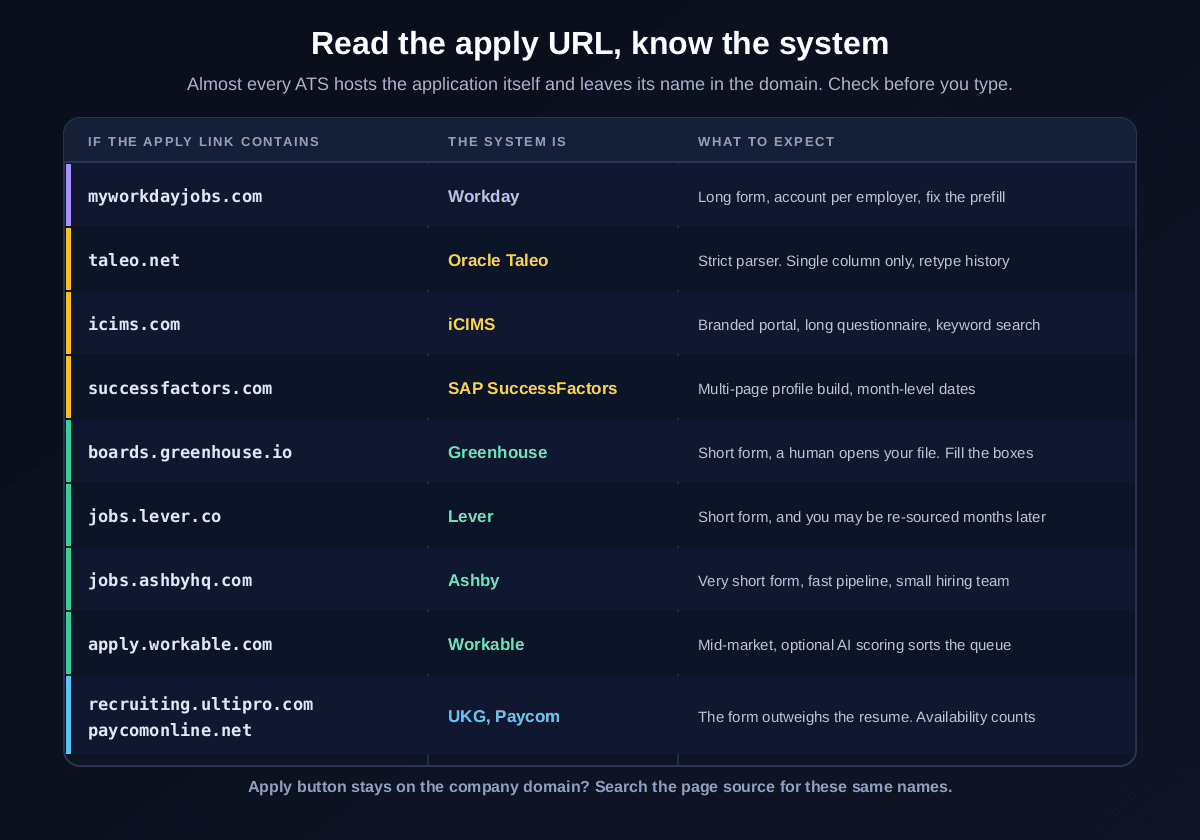
If the apply button keeps you on the company's own domain, the system is still there, wearing a branded skin. View the page source or open your browser network tab and search for the same names. A careers page at a large employer that loads assets from icims.com is an iCIMS instance no matter what the header logo says.
Why this two-minute check pays for itself
Applicant tracking systems list: the platforms you will actually meet
Hundreds of products exist. In practice a job search runs into the same dozen, and which dozen depends entirely on the kind of employer you target. Here they are, grouped by how they treat your application.
- Workday. The default at large enterprises. Its own account per employer, a long multi-step form, structured skills and experience fields, and persistent candidate profiles. Some employers enable AI ranking through HiredScore, which Workday acquired, so a recruiter may see graded candidates. URL:
*.myworkdayjobs.com. - Oracle Taleo. The old guard, still everywhere in banking, healthcare, government and defence contractors. Strictest parsing of the group, dated forms, and heavy recruiter keyword search inside the database. Oracle steers new customers to Oracle Recruiting Cloud, but Taleo instances remain live. URL:
*.taleo.net. - iCIMS. Enterprise and large mid-market, common in retail, logistics and healthcare. Branded career portals, long questionnaires, solid parsing, and a strong search and filter layer for recruiters. URL:
*.icims.com. - SAP SuccessFactors. Global enterprises running SAP. Multi-page applications, mandatory profile building, and locale-specific fields. Expect the longest forms outside Workday. URL: a careers path on
*.successfactors.comor an employer domain proxying it. - Greenhouse. The tech and scaleup standard. Short forms, one file upload, structured interview scorecards later in the process, and no resume score deciding your fate. A human works the review queue. URL:
boards.greenhouse.ioorjob-boards.greenhouse.io. - Lever. Popular with scaleups, built around a candidate relationship database as much as a pipeline, so past applicants get sourced again. Short applications. URL:
jobs.lever.co. - Ashby. Newer, analytics-heavy, increasingly common at fast-growing startups. Very short applications, fast pipelines. URL:
jobs.ashbyhq.com. - Workable and SmartRecruiters. Mid-market workhorses across many industries. Both offer employer side candidate scoring and ranking features, which some teams enable and many ignore. URLs:
apply.workable.com,jobs.smartrecruiters.com. - BambooHR, JazzHR, Teamtailor, Recruitee, Pinpoint. Small and mid-sized business tools. Light forms, small hiring teams, and often a founder or manager reading every application personally. URLs include
*.bamboohr.comand*.applytojob.com. - UKG (formerly UltiPro), Paycom, Paylocity, ADP. Payroll and workforce suites with recruiting attached, dominant in hourly retail, hospitality, healthcare and manufacturing. The structured form frequently matters more than the attachment. URLs include
recruiting.ultipro.com,*.paycomonline.net,recruiting.paylocity.com. - Bullhorn.The staffing and recruitment agency standard. Applying here usually means entering an agency's talent pool rather than applying to one named employer, and a recruiter will call you about roles that may differ from the advert. URL:
*.bullhornstaffing.comand agency-branded portals. - Jobvite, Phenom, Avature, Eightfold. Enterprise talent platforms, often layered on top of another system for the career site, search and internal mobility. If a career site feels unusually slick at a very large company, this layer is why. URLs include
jobs.jobvite.com.
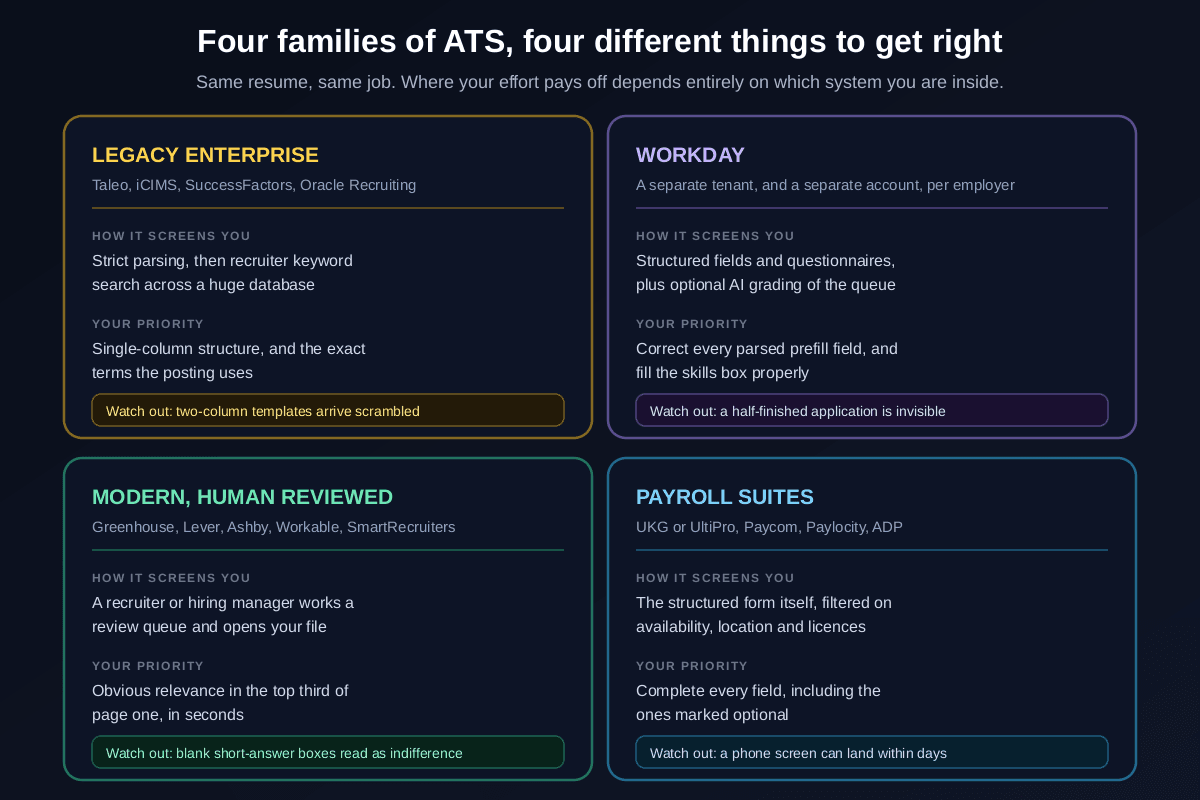
That grouping is the whole strategy in one picture. Four families, four different things to get right, and one resume format that is safe in all of them. Everything below is detail on those four.
Before you submit, check what the posting is actually asking for
Paste your resume and the job description. Rankid returns a 0 to 100 match score, the requirements you have already evidenced, and the specific ones you have not, so you know what to fix while the form is still open. Your first check is free, no signup.
Check your match freeDo applicant tracking systems automatically reject resumes?
Almost never for what the resume says. This myth costs job seekers enormous amounts of wasted effort on font choices and imaginary robot scores, so it is worth being precise about the three real failure modes.
One, the form disqualifies you. Knockout questions are rules you answer yourself: work authorisation, sponsorship, a required licence, a minimum years-of-experience threshold, a salary floor, an on-site location, a start date. These produce genuine instant rejections, and they are by far the most common cause of a same-day reply.
Two, the parser mangles you. If your file cannot be read cleanly, your record arrives with a blank employment history or a job title glued to a date. Nothing rejected you, but a recruiter looking at a broken record moves on in seconds. This is a formatting problem with a formatting fix, covered in detail in how to make an ATS-friendly resume.
Three, you never appear in the search. Recruiters working a pile of hundreds do not read all of them. They search and filter inside the system for the terms in the requisition, then review the results. If your resume uses different words for the same skill, you are not ranked low, you are absent. That is the mechanic behind choosing the right resume keywords, and it is the same behaviour that decides why resumes get rejected without a human read.
Ranking features do exist on top of that. Workday customers can enable HiredScore grading, Workable and SmartRecruiters offer candidate scoring, and enterprise platforms like Eightfold and Phenom are built around matching. Where these are switched on, they sort the queue rather than issue verdicts, and their use is increasingly regulated: New York City's Local Law 144 requires annual bias audits and candidate notice for automated employment decision tools, and the EU AI Act treats recruitment AI as high risk. Practically, assume a human decides and a machine chooses the reading order.
Applying through Workday: what actually happens
Workday deserves its own section because it is the system most candidates meet most often at large employers, and the one that generates the most complaints. The key thing to understand is that it is a human resources platform, not a job board. Each employer runs its own tenant, which is why your account never carries over and why the form is a record rather than an email with an attachment.
Upload your resume first, then fix the prefill
Workday parses your upload to prefill experience, education and skills. The prefill is often wrong: merged titles, dropped employers, mangled dates. Upload anyway, because correcting fields is much faster than typing them, then audit every single one. Recruiters filter on those structured fields, so an error there is more expensive than the same error in the attachment.
Treat the skills field as a keyword field
Workday's skills entries feed search and matching. Add the specific named tools and competencies from the posting that you genuinely have, using the posting's spelling. This is the single highest-value box on the form and most candidates leave it nearly empty.
Answer the questionnaire carefully, then save your login
The questionnaire is where knockouts live, so slow down for those two minutes. Then save the employer-specific username and password, because your profile persists in that tenant and the second application at the same company takes a fraction of the time.
On statuses: employers name their own stages, so labels vary, but the common progression is Received or Submitted, then Under Consideration or In Review, then Interview or Assessment, then Offer, or Not Selected at any point. Statuses update in batches and often jump straight from Under Consideration to a rejection, so read nothing into a label sitting still. Calibrate your expectations against real timelines in how long it takes to hear back after applying instead.
Greenhouse, Lever and Ashby: the ones where a human reads you
Modern systems invert the problem. The application is short, often a file upload plus four fields, and the parser is not your enemy because a recruiter or hiring manager opens the actual document in a review queue. Nobody is scoring your margins.
So your effort moves. What decides the outcome is whether the top third of page one makes your fit obvious in the few seconds it gets, which is the behaviour measured in how long recruiters look at a resume. A headline and summary aimed at that specific role, then your most relevant role with numbers in it, beats a perfectly formatted document that buries the relevant work on page two.
- Take the optional questions seriously."Why do you want to work here" boxes in Greenhouse and Lever are read, and three specific sentences referencing the actual product beat a paragraph of enthusiasm. Blank boxes read as a mass application.
- Expect to be re-sourced. Lever in particular is built around a candidate database, so a good application to a filled role can resurface months later for a different one. Applying is not always wasted.
- Assume real people, small teams. At a 60-person startup on Ashby, a founder may read every application. Write for that reader, not for an imaginary filter.
- Still tailor. Human review does not mean generic works. It means the tailoring has to be visible immediately, which is exactly what tailoring to the job description is for.
Taleo, iCIMS and SuccessFactors: the strict parsers
Legacy enterprise systems are where formatting risk is real. They were built when parsing was cruder, they are configured conservatively, and the recruiters using them lean heavily on internal keyword search across very large candidate databases. Two consequences follow.
First, structure discipline is not optional here. Single column, standard headings, no tables, no text boxes, no columns, no graphics carrying words, and contact details in the body rather than a header. A layout that survives Taleo survives everything, which is why it is the format worth standardising on. If you are unsure whether yours does, the practical test is in how to test if your resume passes the ATS, and the file-type question is settled in PDF vs Word for ATS.
Second, exact phrasing matters more than anywhere else. If the requisition says "accounts payable" and your resume says "supplier invoicing", a keyword search for the former does not return you. Use the posting's term, and where a synonym genuinely matters to a human reader, carry both. The screening logic behind those searches is laid out in the resume screening criteria recruiters use.
Legacy forms will ask you to retype everything
UKG, Paycom and Paylocity: when the form beats the resume
Payroll suites with recruiting modules dominate hourly hiring in retail, hospitality, healthcare, warehousing and manufacturing. They are optimised for volume and speed to hire, and they behave differently from everything above: the structured application is often the primary record, and the resume attachment is secondary or even optional.
- Fill in every field, including the optional ones. Availability, shift preferences, transport, certifications, right-to-work details. Blank fields read as gaps, and hiring managers filter on them.
- Availability is a real screening criterion. For shift-based roles, wide availability moves you up the pile more than anything on your resume does. Be accurate, but do not artificially narrow it.
- Expect speed. These pipelines can move from application to phone screen in days, sometimes with automated scheduling. Watch your email and voicemail closely after applying.
- Attach the resume anyway. It is what a manager reads when two candidates look identical on the form.
What are knockout questions, and how do you answer them?
Knockout questions are the required questions whose answers can end your application automatically. They exist in every system on this list, and they explain most instant rejections. The usual set:
- Are you legally authorised to work in this country, and will you now or in future require sponsorship.
- Do you hold a named licence, certification, clearance or registration.
- Do you have at least a stated number of years of experience in a named area.
- What are your salary expectations, sometimes as a hard minimum.
- Can you work on site at a named location, and are you willing to relocate.
- When can you start, and what is your notice period.
- Have you previously worked for this employer, and are you related to a current employee.
Answer them accurately. A convenient answer that is not true surfaces at offer or background check stage, and losing a role there is far worse than never getting the interview. Where a field allows nuance, be exact rather than artificially narrow: a salary range with a realistic floor, an availability date that is real. Where you are genuinely borderline, such as a certification in progress or four years against a five-year requirement, give the honest answer and use any comment box for one line of context. And when a question is a hard legal or licensing requirement you do not meet, take the ten-second rejection as a gift and spend the twenty minutes on a role you can actually win.
One resume format that survives every system on the list
You do not need a version per platform. You need one structurally safe document that you re-point at each posting.
- Single column, no tables, no text boxes. Multi-column layouts are the most common cause of scrambled parsing in legacy systems, because the parser reads across the page rather than down the column.
- Contact details in the body of page one. Some parsers discard headers and footers, and losing your own phone number is an avoidable way to lose a job.
- Standard headings. Experience, Education, Skills, Certifications. Not Where I Have Been, not My Toolkit. Parsers map known headings to known fields.
- Real text, never an image. A designed export or a scan contains no readable characters. Everything inside a graphic is invisible, including the skills people most often put there.
- Consistent dates. One format throughout, such as Jan 2023 to Mar 2026, with months included. Mixed formats produce mangled tenure calculations.
- Standard fonts and simple bullets. Any common typeface is fine. Decorative glyphs and icons can arrive as replacement characters.
- PDF by default, DOCX when asked. Modern parsers handle both. Follow explicit instructions when a system gives them.
- Keywords in context, not stuffed.The posting's exact terms, inside real achievements with numbers. A hidden white-text keyword block fools nobody and reads as dishonest when a human opens the file.
The five-minute check before you hit submit
Run this in order. It costs five minutes and it catches the things that actually lose applications.
Identify the system from the URL
Two seconds, and it tells you whether to budget five minutes or thirty, and whether to prioritise clean parsing or top-of-page relevance.
Scan the posting for knockouts before you start typing
Licences, authorisation, location, years of experience. If one is a hard requirement you do not meet, stop here and spend the time elsewhere.
Check your resume against the posting, not against your memory
Paste your resume and the job description into Rankid's free resume checker. You get a 0 to 100 match score plus the requirements you have and have not evidenced. Fix the true gaps in your own words while the form is still open. If you want to know what a decent number looks like, see what counts as a good match score.
Audit the parsed output the system shows you
Workday, Taleo and iCIMS all show you the prefilled or parsed result. Read it. If your last two roles arrived merged or your dates are wrong, that is exactly what the recruiter will see, and it takes a minute to correct.
Fill the optional fields, then submit
Skills entries, availability, the short-answer boxes. Optional to the software, meaningful to the person filtering.
Mistakes that quietly kill applications in specific systems
- Abandoning a Workday form halfway. Unsubmitted applications sit invisible. If the form is long, finish it or save and diary a return, because a half-finished record is identical to not applying.
- Letting the Workday prefill stand uncorrected. The parsed fields are what get searched and filtered, not your attachment.
- Leaving Greenhouse and Lever short-answer boxes blank. Real people read those, and a blank one reads as indifference at exactly the moment your file is being compared to a similar one.
- Using a two-column template on a Taleo or iCIMS application. The single highest-probability way to arrive as an unreadable record in a legacy system.
- Treating a payroll-suite form as paperwork. In UKG, Paycom and Paylocity, the form is the application. The resume is the supporting document.
- Answering knockouts optimistically. It buys a stage and costs you the offer.
- Applying to an agency portal expecting a named employer. Bullhorn and similar mean you are joining a talent pool. Useful, but a different transaction, so ask which client and which role on the first call.
- Assuming any of this replaces a human introduction. A referral or a recruiter who already knows your name outperforms every optimisation on this page, which is why being findable on LinkedIn is worth as much effort as the applications themselves.
Key takeaways
- There is no single ATS. The apply URL tells you which one you are dealing with before you invest any time.
- Legacy enterprise systems like Taleo, iCIMS and SuccessFactors parse strictly, so clean single-column structure and the posting's exact keywords matter most.
- Workday is a form, not an attachment. Upload to prefill, then correct every field, and fill the skills box properly.
- Greenhouse, Lever and Ashby put a human in the review queue, so relevance in the top third of page one beats formatting perfectionism.
- In payroll suites like UKG, Paycom and Paylocity, the structured form outweighs the resume and availability is a real screening criterion.
- Knockout questions cause most instant rejections, not resume parsers. Answer them accurately and treat a fast no as time saved.
- AI ranking exists at some employers, sorts the queue rather than deciding, and is increasingly subject to bias-audit and notice rules.
- One safe format works everywhere: single column, standard headings, real text, contact details in the body, consistent dates.
- Always read the parsed output the system shows you. It is what the recruiter sees.
The useful reframe is this: an applicant tracking system is not a gatekeeper with an opinion about your career, it is a database with a search box, a form with rules, and a queue with a tired human at the end of it. Identify which one you are in, respect its particular constraint, and put your remaining effort where it always belonged, into making the first third of page one obviously relevant to that specific job. The quickest way to know whether it is, check your resume against the job description in Rankid before you submit, and fix what it tells you is missing while the form is still open.
Frequently asked questions
How can I tell which applicant tracking system a company uses?
Look at the domain of the apply link before you fill anything in, because almost every ATS hosts the application on its own infrastructure and leaves its name in the URL. A link containing myworkdayjobs.com is Workday, boards.greenhouse.io or job-boards.greenhouse.io is Greenhouse, jobs.lever.co is Lever, jobs.ashbyhq.com is Ashby, apply.workable.com is Workable, jobs.smartrecruiters.com is SmartRecruiters, taleo.net is Oracle Taleo, icims.com is iCIMS, a careers path on successfactors.com is SAP SuccessFactors, applytojob.com is JazzHR, jobs.jobvite.com is Jobvite, and recruiting.ultipro.com, paycomonline.net or recruiting.paylocity.com are payroll-suite systems from UKG, Paycom and Paylocity. If the apply button keeps you on the company's own domain, check the page source or the network requests for those same names, since many employers put a branded skin over a standard system. Two minutes of checking tells you how long the form will take, whether your resume will be parsed strictly, and whether a human or a filter reads you first.
Do applicant tracking systems automatically reject resumes?
Very few reject you because of what your resume says, and that is the most misunderstood thing about them. The overwhelming majority of automatic rejections come from the application form rather than the document: knockout questions about work authorisation, required licences, minimum salary, notice period, location or willingness to relocate, all of which are answered by you and evaluated by simple rules. What resumes do lose to is parsing and search. If a parser cannot read your file, your work history arrives blank or scrambled and a recruiter skips it in seconds, and if you lack the keywords a recruiter searches for inside the system, you are never in the result set they review. A smaller number of employers do enable ranking features, such as Workday customers using HiredScore or Workable customers using its AI scoring, which grade or sort candidates for the recruiter to review. Even then a person makes the call, they just start at the top of a sorted list.
What are the most common applicant tracking systems in 2026?
For large enterprises and government contractors: Workday, Oracle Taleo, Oracle Recruiting Cloud, SAP SuccessFactors, iCIMS and Phenom. For tech companies, scaleups and modern mid-market employers: Greenhouse, Lever, Ashby, SmartRecruiters and Workable. For small and mid-sized businesses: BambooHR, JazzHR, Teamtailor, Recruitee and Pinpoint. For hourly, retail, healthcare and shift work: the payroll suites, meaning UKG (formerly UltiPro), Paycom, Paylocity and ADP. For staffing and recruitment agencies: Bullhorn. You will meet a handful of these repeatedly in any given job search, because your target industry determines the mix. Applying to Fortune 500 roles means Workday and Taleo forms most weeks, while applying to startups means Greenhouse and Ashby forms that take three minutes.
Why does applying through Workday take so long?
Workday is a full human resources platform rather than a recruiting tool bolted onto a website, so the application is a structured record inside the employer's own tenant, not a resume attached to an email. That means you create a separate account for every employer, since each one runs its own Workday instance, and you complete a multi-step form covering experience, education, skills, questionnaires and disclosures. Uploading your resume prefills much of it through parsing, and the prefill is frequently wrong, which is why the sensible workflow is to upload first and then correct every field rather than typing from scratch. The structured fields matter more than the attachment here, because recruiters filter and search on them. Save your login details per employer, as your Workday profile persists and makes the second application at the same company much faster.
What does Under Consideration mean on a Workday application?
In most Workday tenants it means your application has reached a live stage and has not been rejected, nothing more precise than that. Employers configure their own stage names, so the labels you see vary, but the common set runs roughly: Received or Submitted when the record lands, Under Consideration or In Review while it sits in a recruiter queue or awaits a hiring manager, Interview or Assessment when a step is scheduled, Offer, and then Not Selected or No Longer Under Consideration when it ends. Status rarely updates in real time and often jumps straight from Under Consideration to a rejection, so do not read progress into a label sitting still for weeks. Treat the timeline the same way you would anywhere else: expect a first response within one to two weeks, follow up once, and keep applying in the meantime.
Which resume format works in every applicant tracking system?
A single-column, text-based PDF with standard section headings, real text rather than images, and no tables, text boxes, columns, headers or footers carrying important content. That one format is safe in the strictest legacy parsers such as Taleo, iCIMS and SuccessFactors, and it loses nothing in modern systems like Greenhouse, Lever or Ashby where a human opens the file anyway. Use conventional headings that every parser recognises, meaning Experience, Education and Skills rather than creative alternatives like My Journey. Write dates in a consistent format such as Jan 2023 to Mar 2026. Keep your name, email, phone and city in the body of the first page, never in a header, because some parsers discard header content and you lose your own contact details. Upload DOCX instead of PDF only when a system explicitly asks for it, and never upload a scan or an image-based export, since it contains no readable text at all.
What are knockout questions and how should I answer them?
Knockout questions are the required application questions whose answers can disqualify you automatically, and they cause far more instant rejections than any resume parser. Typical examples: are you legally authorised to work in this country, do you now or will you in future require sponsorship, do you hold a specific licence or certification, do you have a stated minimum number of years of experience, what are your salary expectations, can you work on site at a named location, and can you start within a given window. Answer them accurately, because a false answer surfaces later at offer or background check stage and ends the process worse than a rejection. Where a question offers a range or a free-text field, be exact but not artificially narrow, and where you are borderline, for example on years of experience or a licence in progress, pick the honest answer and use any comment box to give one line of context. If a question is a hard legal or licensing requirement you do not meet, that role is a dead end regardless of how good your resume is, and it is better to know in ten seconds than after twenty minutes of typing.
Does the applicant tracking system change how I should tailor my resume?
The tailoring itself does not change, but where you spend your effort does. In strict-parsing legacy systems such as Taleo, iCIMS and SuccessFactors, formatting risk is real and clean structure plus the exact keyword phrasing from the posting is the priority, because recruiters run keyword searches inside those systems and unparsed text cannot be searched. In modern systems such as Greenhouse, Lever and Ashby, parsing is rarely the problem and a person will read your resume in a review queue, so the priority moves to relevance in the top third of page one and to answering the application questions well. In payroll suites such as UKG, Paycom and Paylocity, the structured form often outweighs the attachment entirely, so complete every optional field rather than assuming the resume covers it. In all four cases you still want the same underlying thing: the specific requirements of that posting, evidenced in your own words, near the top.