How to Get Found by Recruiters on LinkedIn (Keywords, Headline Examples, 2026)
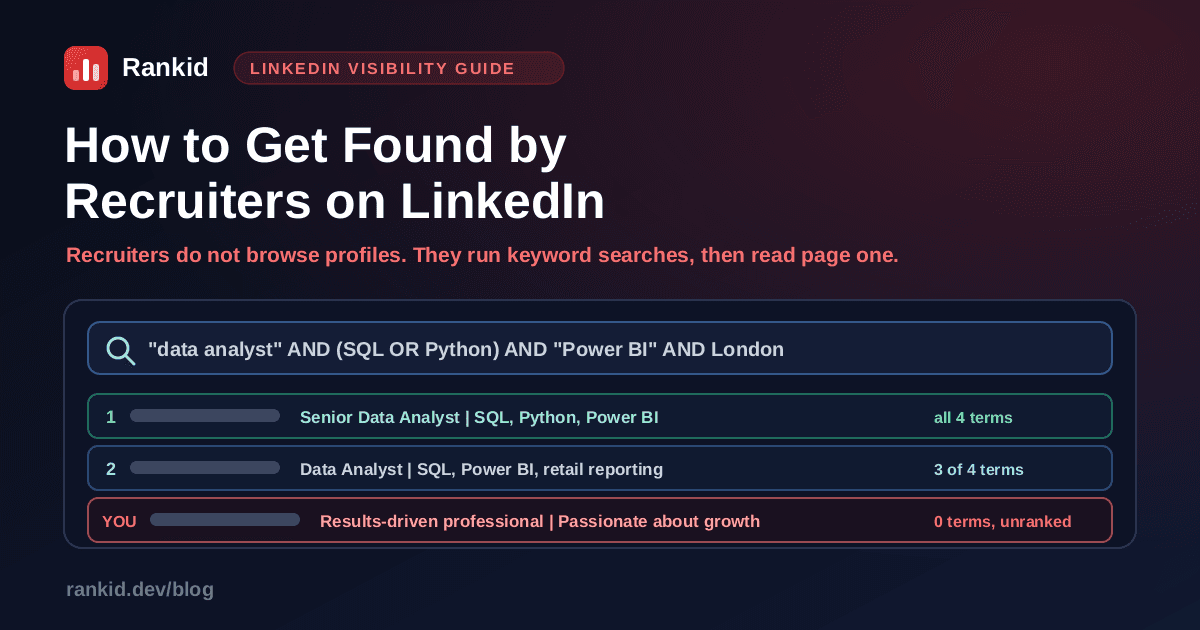
Here is the part almost nobody tells job seekers: recruiters do not browse LinkedIn. They do not scroll a feed hoping to spot talent. They open a search box, type a job title, two or three tools, and a city, and then work down the first page of results. That single fact changes what a good LinkedIn profile looks like. If the words a recruiter types are not in your profile, you are not ranked low, you are simply not in the result set. This guide covers how LinkedIn recruiter search actually works, which profile fields carry search weight, and how to rewrite your headline, About section, skills, and experience so the right searches land on you.
Quick answer
How do recruiters actually find candidates on LinkedIn?
A recruiter opens a role with a job description in hand. Their first move is to translate that description into a query. Most use LinkedIn Recruiter, the paid product built for exactly this, and most build queries with boolean operators, which look like this:
"data analyst" AND (SQL OR Python) AND "Power BI" AND London
Read that query the way the software does. AND means the term must be present. Quotation marks mean the phrase must appear exactly in that order. ORaccepts either alternative. So the search above returns only profiles containing a form of "data analyst", at least one of SQL or Python, the exact phrase "Power BI", and a London location. Every profile without those terms is filtered out before ranking even begins. Nothing about your career quality enters into it at that stage.
On top of the keyword query, recruiters apply structured filters: years of experience, current and past companies, industry, seniority, school, and spotlights such as candidates who are open to work or more likely to respond. Then they sort, skim, and message. The behaviour is the same skimming pattern that governs how long recruiters look at a resume: seconds per profile, decisions made on the headline and current title before anything else gets read.
The one-sentence version
Why am I not showing up in LinkedIn recruiter searches?
When a profile is invisible, it is almost always one of these seven causes, and usually the first three at once:
- Your headline has no job title in it."Results-driven professional passionate about growth" matches no query any recruiter has ever run. The headline is the highest-weight text field you own, and adjectives waste all of it.
- Your job title is an internal one."Member of Technical Staff II", "Growth Ninja", or "Associate, Practice Group 4" are unsearchable. Nobody types them. Use the industry standard title, and put the internal one in the description if you want the record to be exact.
- Your skills list is thin or empty. Skills are a hard filter. Five skills means you qualify for five searches instead of fifty.
- Your experience entries have no body text. A title and dates with no description gives the index nothing to match on, and gives a recruiter nothing to read once they arrive.
- Your location is too broad or missing.Recruiters filter by city or metro area. "United Kingdom" drops you out of a London search in some views, and a blank location drops you out of all of them.
- Your profile is not public.Check your visibility settings. A restricted profile can be invisible to search engines and weaker in LinkedIn's own results.
- You are completely dormant. No posts, no comments, no updates for two years. Activity is not the main ranking signal, but it feeds profile views, and profile views feed the searches that end on your page.
Notice that none of these are about your career. They are all about text. This is the same distinction that decides whether an application survives AI resume screening: software matches strings first, humans judge quality second, and losing at step one means step two never happens. If you are getting no inbound interest and no replies to applications either, read why you are not getting interviews alongside this, because the two problems usually share a root cause.
Which parts of your LinkedIn profile carry search weight?
Not all fields are equal. Some are indexed and shown in every result, some are indexed but rarely decisive, and some are pure decoration as far as search is concerned. Spend your effort in the order below.
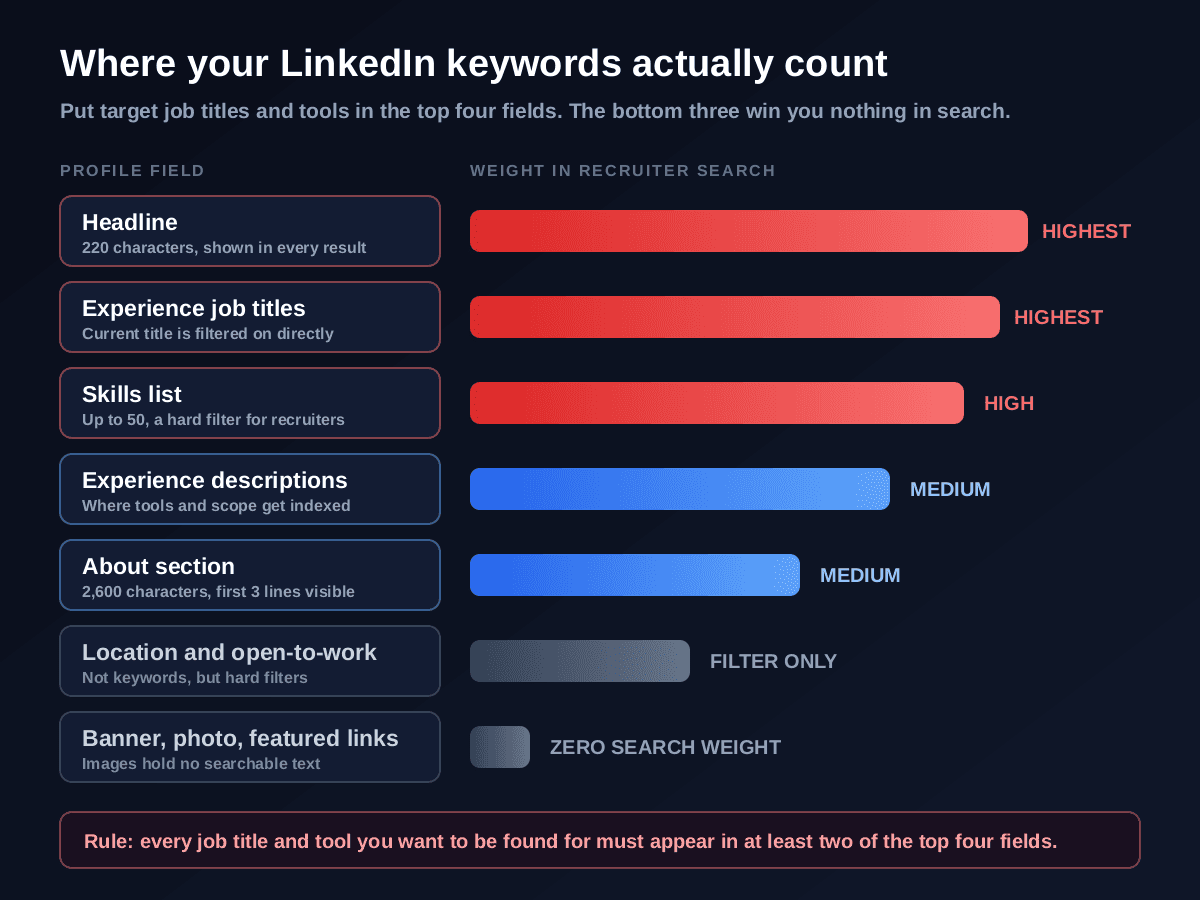
The practical rule from that chart: every job title and tool you want to be found for should appear in at least two of the top four fields. One mention can be a coincidence of phrasing. Two or three mentions across the headline, your current title, your skills, and the experience body is what makes you rank rather than merely qualify. And the fields at the bottom deserve a warning. People spend hours on a custom banner graphic and a beautifully designed featured PDF. Neither contains a single searchable word, exactly like text trapped inside an image on a resume.
How do you find the right keywords for your LinkedIn profile?
Do not guess, and do not use a generic list of "top LinkedIn keywords". The correct keywords for you are sitting in the job descriptions you want to be contacted about. Harvest them in four steps.
Collect five to ten real postings for your target role
Pick the job you want next, not the job you have. Save five to ten current postings from companies you would genuinely join, across a couple of variations of the title. Ten postings is enough to separate real requirements from one company's quirks.
Count what repeats across all of them
Read them side by side and tally three things: the exact job titles used, the named tools and technologies, and the domain words such as B2B SaaS, clinical trials, or public sector. Anything appearing in six or more of ten postings is a keyword you must carry. Anything in two of ten is optional.
Watch for variants, because recruiters type different ones. "Data analyst" and "business intelligence analyst" may both be searched for the same job. Where two variants both appear often, cover both: one in your headline, one in your experience or skills.
Diff the list against your current profile
Open your profile beside your keyword list and mark every term that is genuinely missing, meaning it appears nowhere in your headline, titles, skills, About, or experience text. That missing list is your work queue, ordered by how often each term repeated across the postings.
The fastest way to build that diff is to let a tool do the comparison for you. Paste your resume and one of those job descriptions into Rankid's free resume checker and it returns a 0 to 100 match score plus the specific skills and requirements you have not evidenced. Those flagged gaps are precisely the terms worth adding to LinkedIn, because they are the terms the market keeps asking for. The technique is the same one behind choosing resume keywords to get past an ATS, applied to a profile that has to serve many searches instead of one application.
Place each term where it will be honest and useful
Never add a keyword for a skill you do not have. Instead, place the ones you do have where they count: target title into headline and current position, tools into skills plus at least one experience bullet, domain words into About and the relevant role. If a term repeats constantly and you truly lack it, that is not a profile problem, it is a real gap, and it tells you what to learn or which adjacent roles to target instead.
Find the keywords you are missing in about a minute
Paste your resume and a job description for the role you want. Rankid returns a 0 to 100 match score, the skills you have already evidenced, and the exact requirements you have not. Those gaps are your LinkedIn keyword list. Your first check is free, no signup.
Check your match freeHow to write a LinkedIn headline recruiters can find
The headline is the most valuable 220 characters on the internet for a job seeker. It is indexed heavily, it appears beside your name in every search result, every comment, and every connection request, and it is the single line that decides whether a recruiter clicks. LinkedIn defaults it to your current job title, which is a wasted opportunity for almost everybody.
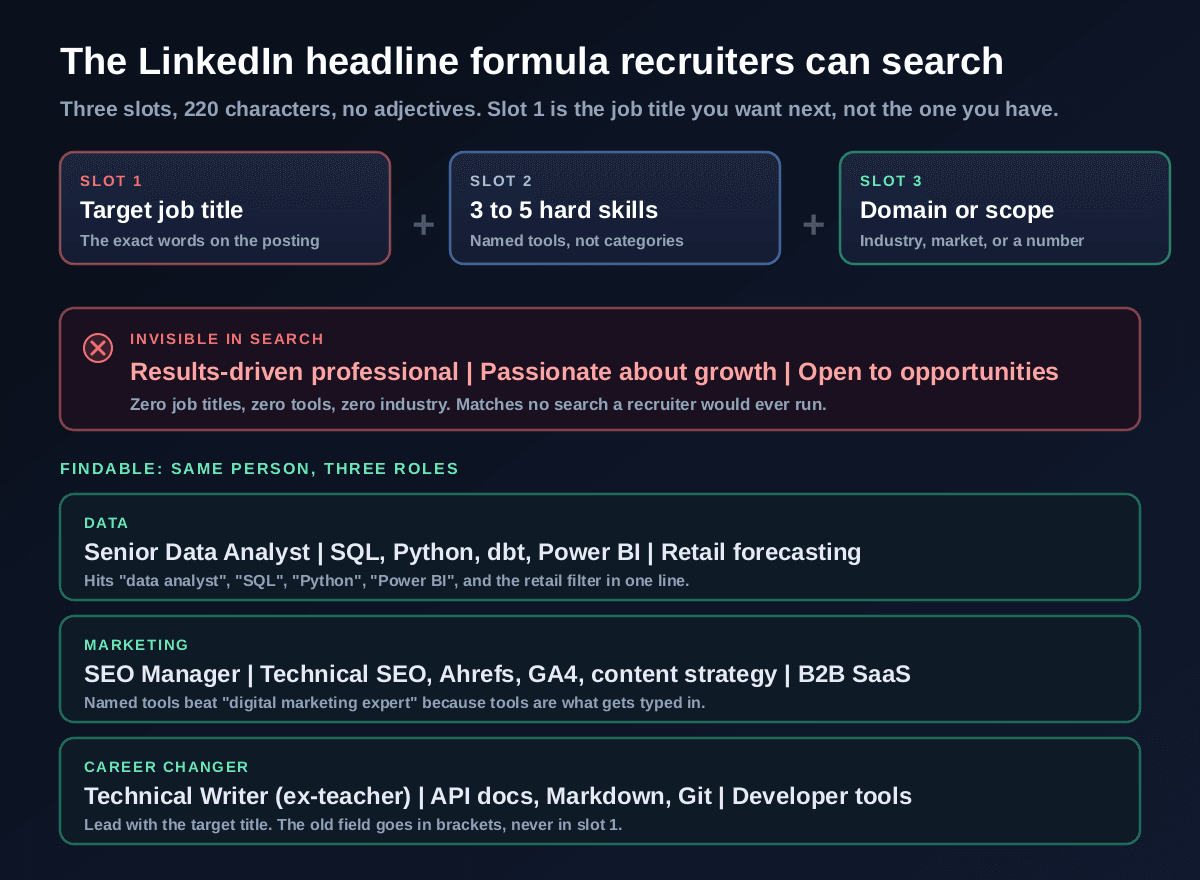
Three slots, separated by pipes. Slot one is the job title you want next, in the words postings use. Slot two is three to five named hard skills, chosen from your repeat-count list. Slot three is domain or scope: an industry, a market, or a number that establishes the size of what you handle. That is the whole formula, and it works because it mirrors how the query is built on the other side of the search box.
Some more examples, so you can see the pattern hold across fields:
- Finance:Financial Analyst | FP&A, Excel modelling, NetSuite, Power BI | SaaS, 40M ARR portfolio
- Engineering: Backend Engineer | Python, Django, PostgreSQL, AWS | Payments and high-volume APIs
- Nursing: Registered Nurse (RN, BSN) | ICU, telemetry, ACLS certified | Level 1 trauma centre
- Operations:Supply Chain Manager | S&OP, SAP, demand planning | FMCG, 12 distribution centres
- Early career: Junior Data Analyst | SQL, Python, Tableau | Economics graduate seeking analyst roles
Three failure modes to avoid. The first is adjective stuffing: passionate, dynamic, results-driven, hard-working. No recruiter has ever typed those, and each one costs you characters that could carry a tool name. The second is the vague umbrella term. "Digital marketing expert" loses to "SEO Manager | Technical SEO, Ahrefs, GA4" every time, because tools are what get typed. The third is hiding your target behind your past. If you are moving fields, lead with the destination and bracket the origin: "Technical Writer (ex-teacher) | API docs, Markdown, Git". That is the same repositioning logic that drives a career change resume, compressed into one line.
Employed and being discreet?
What should your LinkedIn About section say?
The About section gives you 2,600 characters, but only the first three lines show before the "see more" link. So it has to work twice: those first three lines are the hook, and the rest is keyword and evidence territory. Write it in the first person, unlike a resume, because a profile in third person reads oddly to a human reader.
Use this shape:
- Lines 1 to 3, the hook:who you are professionally, what you do, and your single strongest quantified proof. "I am a data analyst who turns messy retail data into forecasts people actually trust. Last year my demand model cut stockouts 23 percent across 40 stores."
- The middle, the evidence: two to four short paragraphs or bullets covering the kinds of problems you solve, the tools you use by name, and two or three results with numbers attached. This is where the bulk of your keywords live naturally.
- A skills line: a plain, readable list of your core tools and specialisms. Not elegant prose, but genuinely useful for both search and skimming.
- A closing line with a next step:what you want and how to reach you. "I am open to senior analyst roles in retail or e-commerce. Reach me at name@email.com."
Two things kill this section. One is opening with your life story: "Ever since I was a child I have been fascinated by numbers" burns the only three lines anyone sees. The other is writing a paragraph with no facts in it at all. The fix is the same discipline as quantifying achievements on a resume: attach a number, a scale, or a timeframe to every claim. If you already have a strong resume summary, your first three lines are largely written, rewritten into first person.
How many skills should you list on LinkedIn, and which ones?
Use as many of the 50 available slots as you honestly can. This is not a place for modesty, because skills are a hard filter in recruiter search: a skill you did not list is a search you silently dropped out of. Then order them deliberately.
- Pin the five that match your target role. LinkedIn displays your top five most prominently and associates them with your profile in several views. These five should be the highest repeat-count tools from your posting research, not your five favourites.
- Collect endorsements on those five specifically. Endorsements are a weak signal in isolation, but they break ties between similar profiles and they make a recruiter more confident clicking. Ask three former colleagues to endorse the same five, and endorse theirs in return.
- Cover both the tool and its categorywhen both get searched, for example "Power BI" and "data visualization", or "Kubernetes" and "container orchestration". Different recruiters type different levels of abstraction.
- Use the spelling the postings use.If ten job descriptions say "Power BI", do not write "PowerBI". Exact-phrase searches are unforgiving about this.
- Prune the skills from a career you left. Twelve teaching skills on a profile targeting technical writing dilute the picture and can pull you into the wrong searches.
The selection logic is identical to picking which skills to put on a resume, with one difference: a resume is tailored to a single posting, while your LinkedIn skills list should span every variant of the role you would accept. Wider is better here.
How to write experience entries that get indexed
The experience section is where most profiles quietly give up. A title, a company, dates, and nothing else. That pattern costs you twice: the index has no text to match, and a recruiter who does arrive learns nothing.
Three rules fix it.
First, use the standard job title, not the internal one.If your badge says "Member of Technical Staff II" but the market calls it "Senior Software Engineer", put the market title in the title field and explain the internal one in the first line of the description. Recruiters filter on the title field, so an unsearchable title there is an expensive kind of accuracy.
Second, write three to five bullets per role, each carrying a tool and a result."Rebuilt the weekly sales report in Power BI and dbt, cutting manual prep from 6 hours to 20 minutes" earns keywords for Power BI and dbt while proving impact. "Responsible for reporting" earns nothing at all. Open each bullet with a real verb, using the same principle as strong resume action verbs.
Third, keep dates identical to your resume. Recruiters open both documents side by side, and mismatched dates or titles read as carelessness at best. If you have a gap, handle it the same calm way you would on paper, as described in how to explain employment gaps.
Should you turn on Open to Work?
Yes, but choose the right version, and know that there are two. The public frame is the green #OpenToWork ring around your photo, visible to everyone. The recruiters-only setting tells LinkedIn you are open without displaying anything publicly, and puts you into an Open to Work spotlight that recruiters can filter and sort by inside LinkedIn Recruiter.
- Recruiters only is the default recommendation for most people. You get the visibility benefit where it matters, with no public signal and no stigma risk. Note that LinkedIn cannot guarantee your current employer never sees it, though it does filter out recruiters at your own company.
- The public frame makes sense when speed beats optics: after a layoff, at the end of a contract, or when you want your entire network activated. It does measurably increase inbound messages, and it also tells every viewer you are looking, which a minority of hiring managers weigh negatively.
- Either way, fill in the details it asks for. The setting collects target job titles, locations, start date, and work types. Those fields feed the filters recruiters apply, so a half-filled Open to Work setting wastes most of its value.
Does an All-Star profile help you rank?
All-Star is LinkedIn's completeness rating, earned by having a photo, headline, industry and location, a current role with a description, two or more past roles, education, at least five skills, and a reasonable number of connections. LinkedIn has long said that more complete profiles appear more often in search, and the reason is mechanical rather than mysterious: every completed field is another block of indexable text and another filter you can satisfy.
But do not confuse completeness with optimisation. A fully completed profile filled with keyword-free prose still loses to a thinner profile that names the right title and the right tools. Reach All-Star because it removes obvious disqualifiers, then go back and fix the words inside those fields. That is where the ranking actually comes from. And while you are in settings, claim a custom profile URL and make sure your profile is public. Both are two-minute jobs that help you surface in Google searches for your own name, which is what a hiring manager runs after a good interview.
Should your LinkedIn profile match your resume?
The facts must match. The wording should not. Titles, employers, and dates need to be identical across both, because those are the fields people cross-check and any drift looks like an inconsistency you are hiding. Everything else should be written for a different purpose.
Your resume is a one-to-one document: tailored to a single posting, dense, third person, optimised to survive parsing and a six-second skim, which is why tailoring it to each job description works so well. Your LinkedIn profile is a one-to-many document: a single public page that has to appear in dozens of different recruiter searches, written in the first person with room for voice. So the resume goes narrow and exact, while the profile goes wide on keyword coverage and keeps the same underlying numbers. Before you apply anywhere, it is still worth a check that the narrow document actually matches the posting, which is what checking your resume against a job description is for.
The 20-minute weekly LinkedIn routine while job hunting
Optimisation is not a one-off project, because postings drift and tool names change. A short weekly loop keeps your profile aligned with what recruiters are typing this month.
- Minutes 1 to 8: open three fresh postings for your target role. Note any title variant, tool, or domain phrase you are not currently carrying, and add the honest ones.
- Minutes 9 to 14: improve one experience description. Add a number, name a tool, delete a responsibility-flavoured sentence.
- Minutes 15 to 20: post or comment once with something substantive in your field. This is for profile views, which feed the searches that end on your page, not for vanity metrics.
- Once a month: search for yourself the way a recruiter would. Type your target title plus your top two tools plus your city into LinkedIn search and see whether you appear. If you do not, you now know exactly which field to fix.
Run the search a recruiter would run
"your target title" AND "your main tool" AND your city into LinkedIn search and scrolling until you find yourself. If you are on page four, you have a text problem, not a career problem, and text problems are fixable in an afternoon.LinkedIn profile mistakes that keep you invisible
- A headline of adjectives. Zero searchable terms in your highest-weight field. The most common and most expensive mistake on the platform.
- Keyword stuffing to compensate. A headline crammed with 20 tool names reads as spam to the human who has to click it, and the click is the whole point. Cover three to five, then use the other fields.
- Empty experience entries. Titles and dates alone give the index nothing and give the reader nothing.
- Keywords hidden inside images. A banner or featured graphic listing your skills is invisible to search, in exactly the way a resume saved as an image is invisible to a parser.
- A profile that contradicts your resume. Different dates, different titles, different employers. Recruiters do check.
- Listing every skill you have ever touched. Fifty skills spread across three unrelated careers pulls you into the wrong searches and dilutes the right ones.
- Waiting until you need a job. A profile built while you are employed accumulates endorsements, recommendations, and a real activity history. One rebuilt in a panic has none of that.
Key takeaways
- Recruiters find candidates by running keyword searches, not by browsing, so your profile has to contain the words they type.
- Headline, experience job titles, and the skills list carry the most search weight. Banners and featured images carry none.
- Put the job title you want next in your headline and current position, not the internal title only your employer uses.
- Use the headline formula: target title, then three to five named tools, then domain or scope. No adjectives.
- Fill all 50 skill slots you honestly can, pin the five that match your target role, and get endorsements on those five.
- Give every experience entry three to five bullets that each carry a named tool and a quantified result.
- Turn on Open to Work for recruiters only unless speed matters more than discretion, and complete the target title and location fields.
- Keep titles, employers, and dates identical to your resume, but write LinkedIn wider and in the first person.
- Every month, search your target title plus your top tool plus your city and check whether you appear.
Getting found by recruiters on LinkedIn is not a charisma problem or a networking problem. It is a text problem with a known solution: work out which words are being typed into the search box, then make sure those words appear, honestly, in the fields that carry weight. Start with the headline, because it is one line and the highest-leverage field you own. The quickest way to build your keyword list is to see which requirements you are not currently evidencing, so paste your resume and a job description for the role you want into Rankid's free resume checker, take the gaps it reports, and put the true ones into your profile this week. Then run the recruiter search on yourself and watch where you land.
Frequently asked questions
How do recruiters find candidates on LinkedIn?
Almost never by browsing. A recruiter with a role to fill opens LinkedIn Recruiter or LinkedIn search and types a query built from the job description: a job title, two or three must-have tools or skills, and a location, often combined with boolean operators such as "data analyst" AND (SQL OR Python) AND "Power BI". LinkedIn returns a ranked list of profiles that contain those terms, filtered further by things like years of experience, current company, industry, and whether you appear open to opportunities. The recruiter then works down the first page or two and sends messages. This means your profile is competing in a keyword search, not a beauty contest. If the exact words a recruiter types do not appear anywhere in your headline, job titles, skills, About section, or experience descriptions, you are not ranked low in the results, you are excluded from them entirely.
Why am I not showing up in LinkedIn recruiter searches?
The most common cause is a profile written in personality language rather than search language: a headline like "Results-driven professional passionate about growth" contains no job title, no tool, and no industry, so it matches nothing a recruiter would ever type. The other frequent causes are a current job title that uses an internal company name nobody searches for, an empty or near-empty skills list, experience entries with a title and dates but no description text, a location field set to a country or left blank when recruiters filter by city or metro area, a profile that is not set to public, and total inactivity, since profiles that are never updated and never post tend to surface less often. Fix the headline, job titles, and skills first, because those three fields carry the most search weight for the least effort.
What should my LinkedIn headline say if I am job hunting?
Use three slots inside the 220 characters: the exact job title you want next, three to five named hard skills or tools, and one line of domain or scope. For example, "Senior Data Analyst | SQL, Python, dbt, Power BI | Retail forecasting" or "SEO Manager | Technical SEO, Ahrefs, GA4, content strategy | B2B SaaS". The critical rule is that slot one holds the title you are targeting, not necessarily your current internal title, because that is the phrase recruiters type. Name specific tools rather than categories, since a recruiter searches "Power BI" and not "data visualisation expertise". Leave out adjectives entirely: passionate, results-driven, dynamic, and hard-working are searched by nobody and consume characters that could be carrying keywords. If you are changing fields, lead with the target title and put your previous field in brackets, for example "Technical Writer (ex-teacher) | API docs, Markdown, Git".
Does the Open to Work badge hurt your chances?
The green #OpenToWork photo frame is public and does carry a small stigma with some hiring managers, but the setting itself is different from the frame and is worth using. LinkedIn lets you signal openness either to everyone, which shows the frame, or privately to recruiters using LinkedIn Recruiter, which adds you to an Open to Work spotlight that many recruiters filter or sort by without showing anything on your public profile. For most people the right configuration is the recruiters-only option: you gain the visibility boost inside recruiter search and lose nothing publicly. Turn on the public frame when speed matters more than optics, for example after a layoff when you want your whole network mobilised, and skip it if you are employed and discretion matters. Either way, fill in the target job titles and locations that setting asks for, because those feed the filters recruiters apply.
How many skills should you list on LinkedIn?
List as many genuinely relevant skills as you can up to LinkedIn's cap of 50, and treat the list as a keyword field rather than a modest self-assessment. Recruiters filter on skills directly, so a missing skill is a search you silently drop out of. Priority order matters too: pin the five that match your target role as your top skills, since those are the ones displayed most prominently and attached to your headline in some views. Then get endorsements on those five specifically, because endorsement counts break ties between otherwise similar profiles and give a recruiter a reason to click. Keep the list honest and current, remove skills from a career you have left behind, and add the exact spellings that appear in job postings, including both a tool and its category where both get searched, such as both "Power BI" and "data visualization".
Does an All-Star profile actually help you rank in searches?
Yes, indirectly but meaningfully. All-Star is LinkedIn's own completeness rating, and it requires a photo, a headline, an industry and location, a current position with a description, two or more past positions, education, at least five skills, and a handful of connections. LinkedIn has consistently said more complete profiles appear more often in search results, and the mechanism is easy to see: each field you complete is another block of indexable text and another filter you can satisfy. The completeness label is not a magic ranking factor on its own, though. A profile that hits All-Star while stuffed with vague, keyword-free prose will still lose to a less complete profile that names the right job title and tools. Treat All-Star as the floor, not the goal, then optimise the words inside those completed fields.
Should your LinkedIn profile match your resume exactly?
The facts must match, the wording should not. Job titles, employers, and dates need to be identical, because recruiters compare the two and any discrepancy in dates or titles reads as a red flag or a fabrication. Everything else should be written for a different job. Your resume is tailored to one specific posting and is scanned by software and a recruiter in seconds, whereas your LinkedIn profile is a single public page that must attract many different searches at once, which means it should be broader in keyword coverage and written in the first person with more voice. In practice: keep the same achievements and numbers, widen the keyword range on LinkedIn to cover every variant of your target title, and never let the dates drift apart.
How often should you update your LinkedIn profile when job hunting?
Touch it weekly while you are actively searching, and quarterly when you are not. A useful twenty-minute weekly routine: re-read three fresh postings for your target role and add any skill or tool phrasing you are missing, refresh one experience description with a quantified result, and post or comment once with substance so you appear in your network's feed. The point of the cadence is not that LinkedIn rewards edits directly, it is that job postings drift, tool names change, and each new posting tells you exactly which keywords are being typed into recruiter searches this month. Activity also compounds: profiles attached to someone who occasionally posts get more profile views, and profile views bring more searches that end on your page.