Is My Employer Monitoring Me? What Bossware Can See, How to Check, and Your Rights in 2026
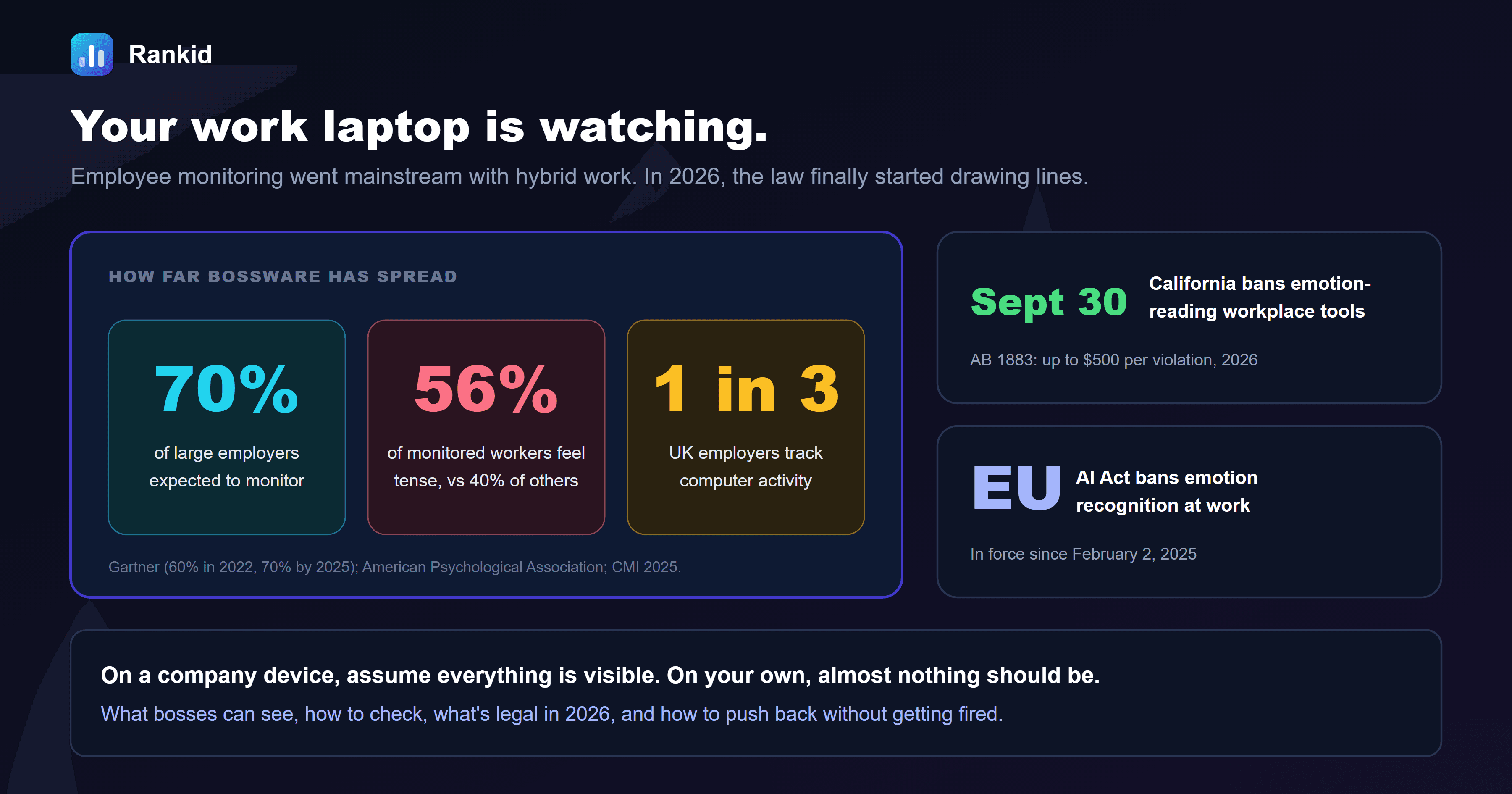
Somewhere on your work laptop, there may be a record of every app you opened today, how long you stared at a spreadsheet, the minute you went idle and the sites you checked while a meeting dragged on. Most people have no idea whether that record exists. On September 30, 2026, California decided some of it goes too far, banning workplace tools that try to read your emotions. Here's what employee monitoring software can actually see, how to check whether it's running, and where the legal lines now sit.
Quick answer
Quick answer: on a company device or account, assume your employer can see everything: screens, apps, websites, keystrokes, files, email and Teams or Slack messages, even at home. On a personal device, it can usually see only a work profile you installed, plus traffic on office Wi-Fi. In the US it's mostly legal with notice (required in New York, Connecticut and Delaware). New limits are arriving: California banned emotion-reading and neural data tools on September 30, 2026, and the EU AI Act has banned emotion recognition at work since February 2025. Don't tamper with monitoring software or use a mouse jiggler; separate your devices and steer the conversation to outcomes instead.
How common is employee monitoring in 2026?
Very. Employee monitoring software, nicknamed bossware, spread fast when offices emptied in 2020 and never left. The numbers:
- Gartner found 60% of large employers used tools to monitor employees in 2022 and expected that to reach 70% by 2025.
- In the UK, a 2025 Chartered Management Institute survey found about one in three employers monitor staff computer activity such as email and web browsing.
- Monitoring is creeping into everyday tools, not just specialist software. Microsoft has been rolling out a Teams feature that can automatically set your work location when your laptop joins a recognized office Wi-Fi network. It's off by default and has to be switched on by your company, but it shows how ordinary office-attendance tracking has become.
Why the boom? A gap Microsoft called productivity paranoia. In its 2022 Work Trend Index, 85% of leaders said hybrid work made it hard to be confident people were productive, while 87% of employees said they were. Monitoring software promises to close that gap with data. The trouble is that most of the data measures activity, not results.
What your employer can actually see
The single most useful rule: what your employer can see depends on whose device and whose account it is, not where you're sitting. A company laptop on your kitchen table is still a company laptop.
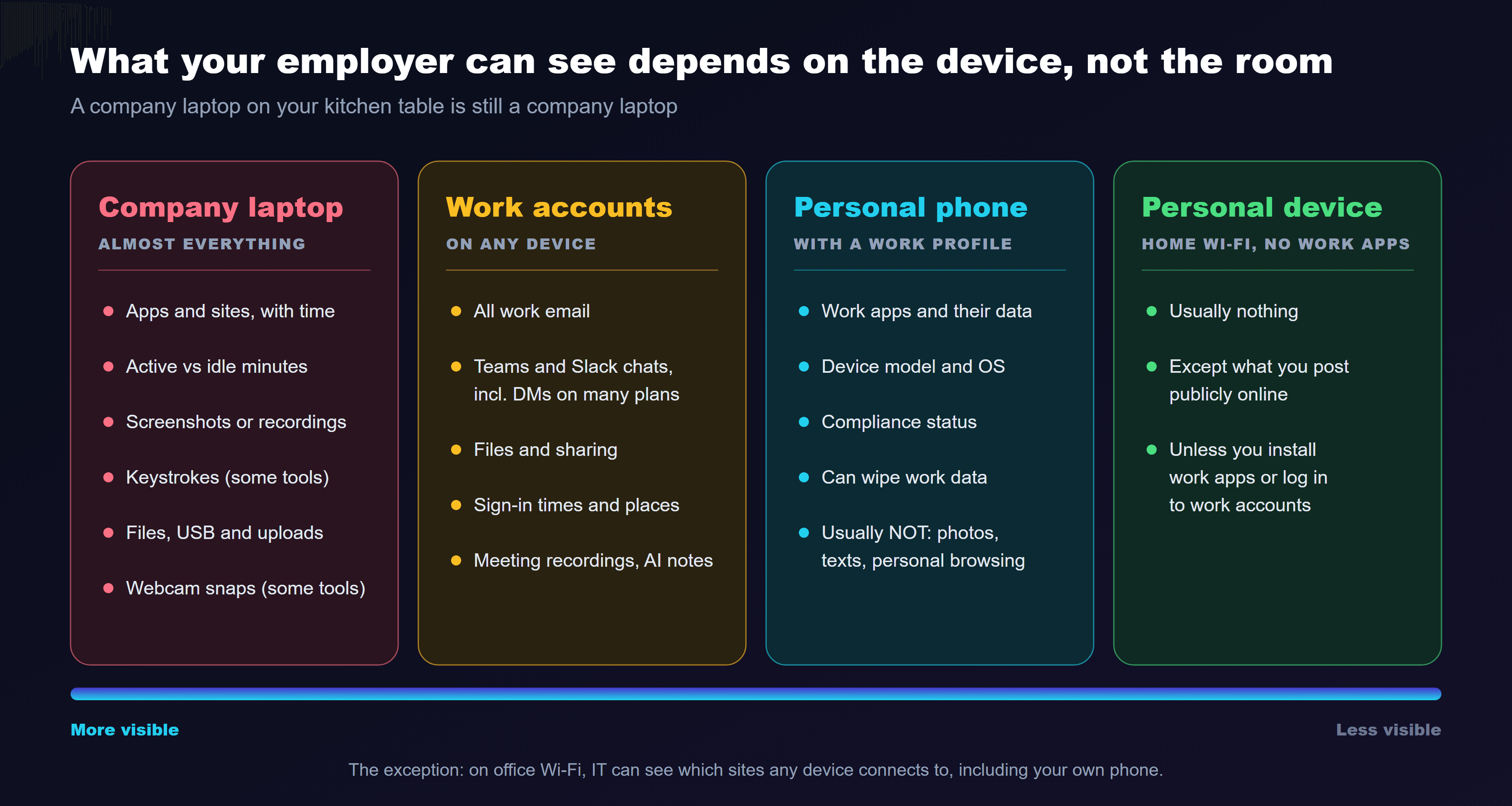
- Company laptop or desktop: assume everything.Depending on the tool, that can include apps and websites with time spent, active vs idle minutes, periodic screenshots or full screen recordings, keystrokes, files copied to USB or uploaded, and, on some products, webcam snapshots. VPNs and incognito mode don't hide activity from software running on the device itself.
- Work accounts, on any device. Your company owns its Outlook, Gmail, Teams, Slack and cloud drive accounts. Admins can typically search and export email and chat, including direct messages on many paid plans, and see sign-in times and locations. Meeting recordings and AI transcripts are company records too.
- Your personal phone with a work profile.Installing a device-management app or work profile to get company email usually lets IT see and wipe the work apps and data, plus device details. A properly separated work profile shouldn't expose your personal photos, texts or browsing, but read what you're approving before you tap "allow."
- Your personal device, on your own network.Generally nothing, unless you've installed work software. The exception is the network: on office Wi-Fi, IT can see which sites any device connects to.
The one-line privacy rule
How to check if you're being monitored
You can't always see monitoring, and some tools run in "stealth mode." But these six checks will tell you a lot in ten minutes.
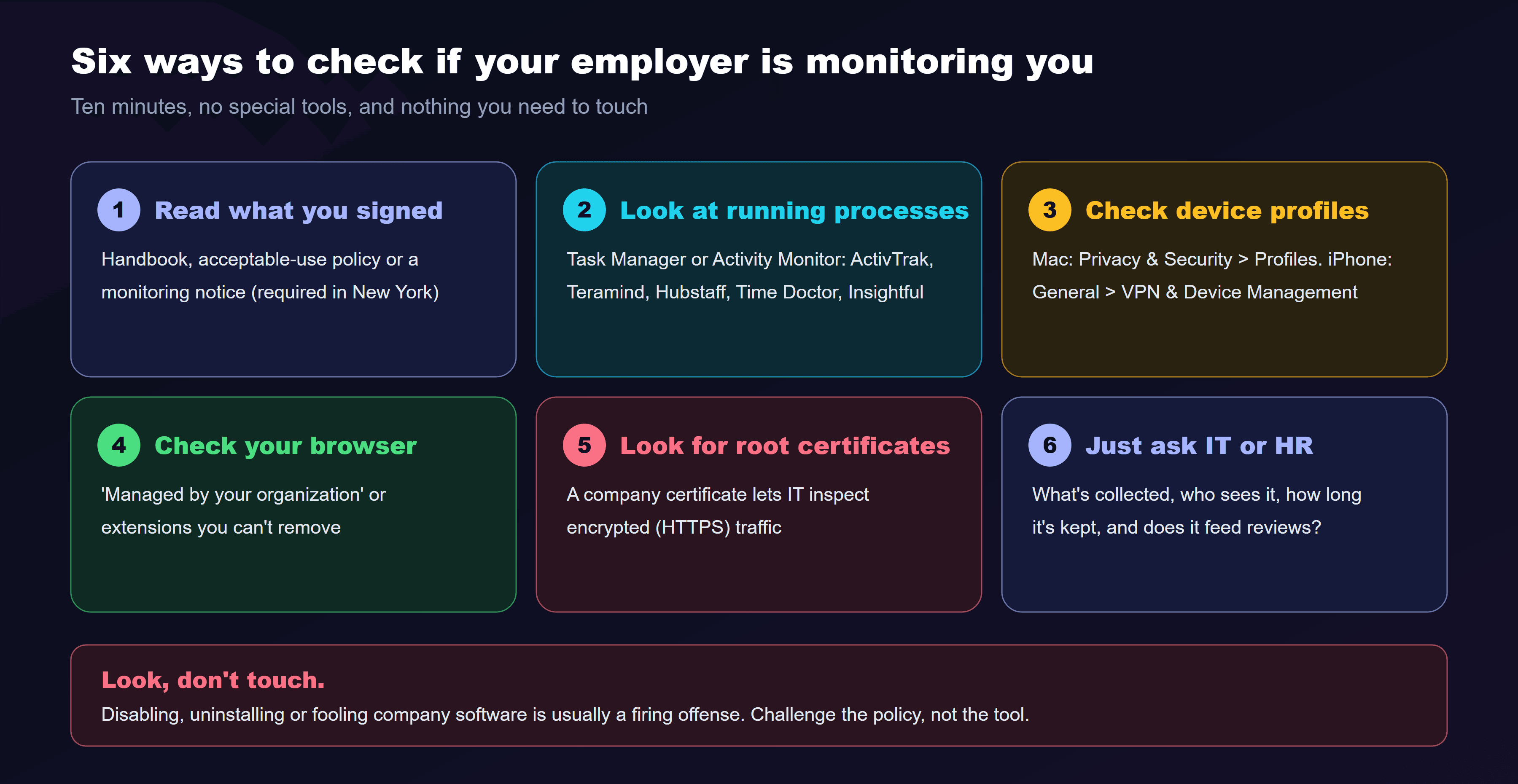
Read what you signed
Look at what's running
Check for device management
Check your browser
Look for company security certificates
Just ask
Look, don't touch
Is employee monitoring legal? Where the lines are in 2026
In the US, monitoring company devices and accounts is mostly legal, particularly with notice. But 2026 is the year the lines started getting sharper. (This is general information, not legal advice.)
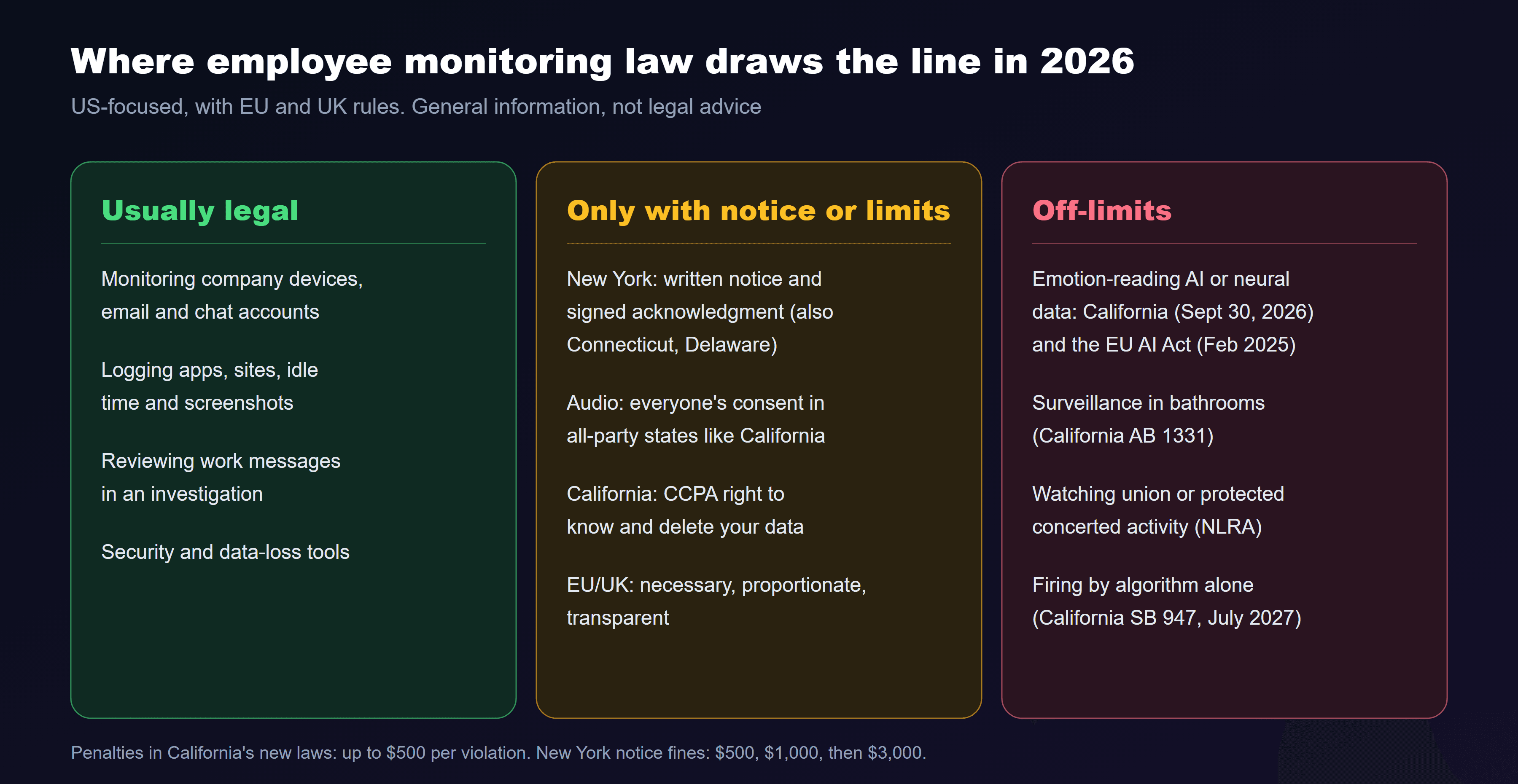
- Federal law gives employers wide room. The Electronic Communications Privacy Act allows monitoring for legitimate business reasons and with consent, which most employers get through the handbook you signed.
- Notice laws. New York requires written notice of electronic monitoring at hiring, a signed acknowledgment and a posted notice, with fines of $500, $1,000 and $3,000 for first, second and later violations. Connecticut and Delaware have notice requirements too.
- California's new rules. On September 30, 2026, California signed AB 1883, banning workplace surveillance tools that use AI to recognize or predict emotional states or that collect neural data (with safety exceptions), and AB 1331, barring surveillance tools in workplace bathrooms with narrow exceptions. Both carry penalties of up to $500 per violation. SB 947, the "No Robo Bosses Act," follows on July 1, 2027, requiring human review before automated systems can be used to discipline or fire someone. California employees can also use the CCPA to ask what personal data their employer holds.
- Audio is different.Recording conversations can require everyone's consent in all-party-consent states, including California, Florida, Illinois and Washington.
- Organizing is protected.Under the National Labor Relations Act, employers generally can't surveil or create the impression of surveilling employees' union or protected concerted activity, such as discussing pay together.
- Europe and the UK.Under GDPR, monitoring must be necessary, proportionate and transparent, and the EU AI Act has banned emotion recognition systems in the workplace (outside medical or safety uses) since February 2, 2025. The UK's data regulator says workers should normally be told what's monitored and why.
Mouse jigglers, green dots and the productivity theater trap
When people feel watched by activity metrics, many start performing activity. That's why mouse jigglers, tiny devices or apps that keep your status green, sell so well. It's also why they're risky. In 2024, Wells Fargo fired more than a dozen employees after a review found "simulation of keyboard activity creating impression of active work," according to regulatory disclosures. Monitoring vendors now advertise jiggler detection, flagging perfectly regular cursor movement and unknown USB devices.
The deeper problem is the measurement itself. Activity isn't output. A developer thinking through a hard problem looks idle; someone shuffling tabs looks busy. The APA found 56% of monitored workers feel tense or stressed at work, compared with 40% of those who aren't monitored. Feeling watched and slowly worn down is a recipe for what we call quiet cracking.
Beat the dashboard with a paper trail
How to protect yourself (without getting fired)
Separate your worlds
Write work messages as if they'll be read
Ask what's collected and how it's used
Know when to escalate
Ask before you accept
Looking for a team that measures results, not mouse movement?
Paste your resume and a job description into Rankid for a free 0-100 match score and the exact requirements you meet and miss, then tailor your application in minutes. No signup required, and no work laptop needed.
Check your match score freeFor employers: monitoring that doesn't backfire
Security, compliance and data-loss monitoring are legitimate, and often legally required. Using activity scores as a stand-in for management is where most programs go wrong. A few principles:
- Be transparent.Publish what's collected, why, who can see it and how long it's kept. Secret monitoring destroys trust when it's discovered, and it usually is.
- Collect the minimum. Keystroke logging and webcam snapshots are rarely necessary. Every extra data point is a liability in a breach or lawsuit.
- Audit your vendors for emotion AI."Sentiment" or "engagement" features that infer feelings are now banned in California and the EU.
- Measure outcomes.Clear goals and regular check-ins tell you more than idle time. If you're worried about overemployment or disengagement, our guides to overemployment and employee turnover cover better fixes.
- Keep a human in the loop. Never discipline someone on a dashboard alone. From July 2027, California will require it.
Hire people you trust from day one
Rankid scores every resume against your job description on a consistent 0-100 scale and shows the exact requirements each candidate matched and missed, so you hire on evidence and spend less time watching dashboards later. First 5 resumes free, no signup.
Try bulk screening freeFrequently asked questions
Can my employer see what I do on my work computer?
Usually, yes. On a company-owned laptop, employers can install monitoring software that records the apps and websites you use, active and idle time, screenshots or screen recordings, keystrokes, files you move and the content of work email and chat accounts such as Outlook, Teams and Slack, including direct messages on paid plans. You should treat a work device as fully visible, even when it's at home and on your own Wi-Fi.
How can I tell if my employer is monitoring my computer?
Check six places: your employee handbook or acceptable-use policy (and any monitoring acknowledgment you signed), the running processes in Task Manager or Activity Monitor for agents such as ActivTrak, Teramind, Hubstaff, Time Doctor, Insightful or Veriato, installed device-management profiles, a browser that says it's 'managed by your organization,' unfamiliar root security certificates that let IT inspect encrypted traffic, and simply asking IT what's collected. Don't try to disable or uninstall anything; tampering with company security software is usually a firing offense.
Can my employer monitor my personal phone?
Only what you let onto it. If you install a work profile or device-management app to get company email, your employer can typically see and wipe the work apps and data, and see device details such as model and OS version, but on a properly separated work profile it shouldn't see personal photos, texts or browsing. If you use your phone on the office Wi-Fi, the company can see which sites and services you connect to. Keep personal activity on a personal device, on your own data plan.
Is employee monitoring legal in the US?
Mostly, on company-owned devices and accounts, especially with notice. Federal wiretap law has broad business-use and consent exceptions. A few states require notice: New York has required written notice and acknowledgment since May 2022, with fines of $500, $1,000 and $3,000 for repeat violations, and Connecticut and Delaware have notice laws too. Limits include recording audio without consent in all-party-consent states, monitoring union or other protected concerted activity, and new California rules signed September 30, 2026 that ban tools inferring emotions or collecting neural data and bar surveillance in bathrooms.
Can my boss read my Teams or Slack direct messages?
Often, yes. Microsoft 365 admins can search and export Teams chats, including one-to-one messages, through compliance tools, and Slack's Business+ and Enterprise plans let admins export all messages, including DMs, under their policies. Assume anything typed in a work chat could be read later, especially in an investigation or lawsuit.
Can employers detect mouse jigglers?
Increasingly, yes. Many monitoring tools flag repetitive, perfectly regular cursor movement or unusual USB devices, and some compare activity with real output. In 2024 Wells Fargo fired more than a dozen employees after a review found 'simulation of keyboard activity creating impression of active work,' according to regulatory filings. Using one can be treated as falsifying work records.
What does California's new workplace surveillance law do?
On September 30, 2026, California signed AB 1883, which bans workplace surveillance tools that use AI to recognize or infer an employee's emotional state or that collect neural data, with exceptions for safety, and AB 1331, which bars employers from using surveillance tools in workplace bathrooms with limited exceptions. Both carry penalties of up to $500 per violation. A separate law, SB 947, the 'No Robo Bosses Act,' will stop employers from relying solely on automated systems to discipline or fire workers from July 1, 2027.
Is monitoring employees bad for productivity?
It can be. The American Psychological Association found 56% of workers who are electronically monitored feel tense or stressed at work, compared with 40% of those who aren't. Activity metrics also measure motion rather than results, which encourages 'productivity theater' such as mouse jigglers and staying visibly online. Monitoring that is transparent, limited to clear security or compliance needs and paired with output-based goals causes far less harm.
Key takeaways
- On a company device or account, assume your employer can see everything: apps, sites, screens, keystrokes, files, email and chat, even at home.
- On a personal device, employers can usually see only a work profile you installed, plus traffic on the office network.
- Gartner expected 70% of large employers to monitor staff by 2025, and the APA found 56% of monitored workers feel tense vs 40% of others.
- Six checks reveal most monitoring: your signed policy, running processes, device profiles, browser management, root certificates, and asking IT.
- US monitoring is mostly legal with notice. New York, Connecticut and Delaware require notice, and audio recording can need everyone's consent.
- California banned emotion-reading and neural data workplace tools on September 30, 2026, plus bathroom surveillance. The EU banned emotion recognition at work in 2025.
- Mouse jigglers and other productivity theater get people fired. A weekly outcomes note is a far better defense.
- Employers should be transparent, collect the minimum, audit for emotion AI, measure outcomes and keep humans in disciplinary decisions.
Frequently asked questions
Can my employer see what I do on my work computer?
Usually, yes. On a company-owned laptop, employers can install monitoring software that records the apps and websites you use, active and idle time, screenshots or screen recordings, keystrokes, files you move and the content of work email and chat accounts such as Outlook, Teams and Slack, including direct messages on paid plans. You should treat a work device as fully visible, even when it's at home and on your own Wi-Fi.
How can I tell if my employer is monitoring my computer?
Check six places: your employee handbook or acceptable-use policy (and any monitoring acknowledgment you signed), the running processes in Task Manager or Activity Monitor for agents such as ActivTrak, Teramind, Hubstaff, Time Doctor, Insightful or Veriato, installed device-management profiles, a browser that says it's 'managed by your organization,' unfamiliar root security certificates that let IT inspect encrypted traffic, and simply asking IT what's collected. Don't try to disable or uninstall anything; tampering with company security software is usually a firing offense.
Can my employer monitor my personal phone?
Only what you let onto it. If you install a work profile or device-management app to get company email, your employer can typically see and wipe the work apps and data, and see device details such as model and OS version, but on a properly separated work profile it shouldn't see personal photos, texts or browsing. If you use your phone on the office Wi-Fi, the company can see which sites and services you connect to. Keep personal activity on a personal device, on your own data plan.
Is employee monitoring legal in the US?
Mostly, on company-owned devices and accounts, especially with notice. Federal wiretap law has broad business-use and consent exceptions. A few states require notice: New York has required written notice and acknowledgment since May 2022, with fines of $500, $1,000 and $3,000 for repeat violations, and Connecticut and Delaware have notice laws too. Limits include recording audio without consent in all-party-consent states, monitoring union or other protected concerted activity, and new California rules signed September 30, 2026 that ban tools inferring emotions or collecting neural data and bar surveillance in bathrooms.
Can my boss read my Teams or Slack direct messages?
Often, yes. Microsoft 365 admins can search and export Teams chats, including one-to-one messages, through compliance tools, and Slack's Business+ and Enterprise plans let admins export all messages, including DMs, under their policies. Assume anything typed in a work chat could be read later, especially in an investigation or lawsuit.
Can employers detect mouse jigglers?
Increasingly, yes. Many monitoring tools flag repetitive, perfectly regular cursor movement or unusual USB devices, and some compare activity with real output. In 2024 Wells Fargo fired more than a dozen employees after a review found 'simulation of keyboard activity creating impression of active work,' according to regulatory filings. Using one can be treated as falsifying work records.
What does California's new workplace surveillance law do?
On September 30, 2026, California signed AB 1883, which bans workplace surveillance tools that use AI to recognize or infer an employee's emotional state or that collect neural data, with exceptions for safety, and AB 1331, which bars employers from using surveillance tools in workplace bathrooms with limited exceptions. Both carry penalties of up to $500 per violation. A separate law, SB 947, the 'No Robo Bosses Act,' will stop employers from relying solely on automated systems to discipline or fire workers from July 1, 2027.
Is monitoring employees bad for productivity?
It can be. The American Psychological Association found 56% of workers who are electronically monitored feel tense or stressed at work, compared with 40% of those who aren't. Activity metrics also measure motion rather than results, which encourages 'productivity theater' such as mouse jigglers and staying visibly online. Monitoring that is transparent, limited to clear security or compliance needs and paired with output-based goals causes far less harm.