LinkedIn's Open to Work Banner: Does It Help or Hurt Your Job Search?
A small green ring around a profile photo has started more arguments on LinkedIn than almost anything else. One former Google recruiter called it "the biggest red flag." Other recruiters say they search for it first. Both sides have been repeating themselves for years, and most of the argument misses the point: Open to Work is two different settings, and which one you pick matters more than whether you use it.
Quick answer
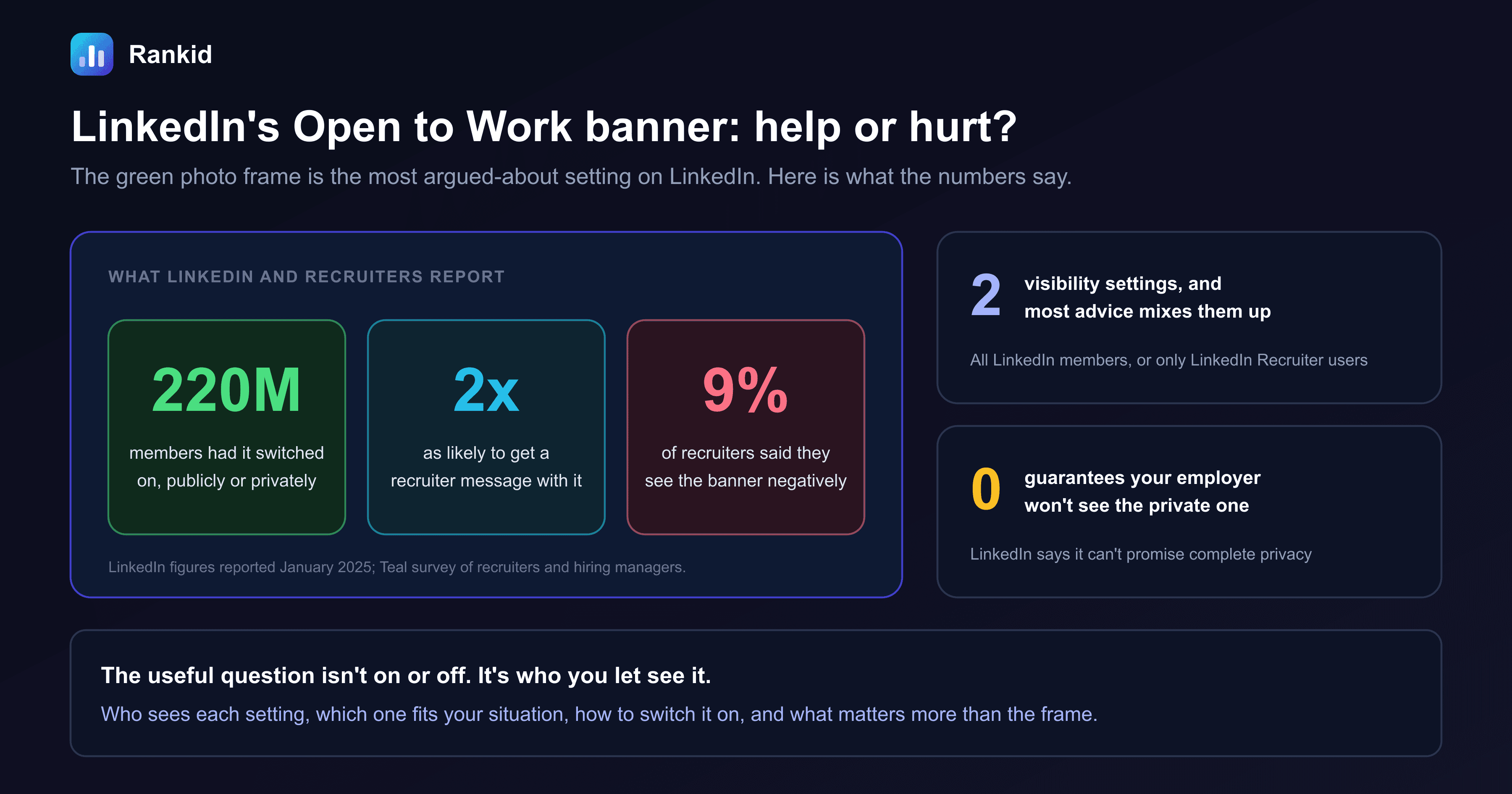
Quick answer: for most job seekers the Open to Work banner helps. LinkedIn says turning the feature on makes you about twice as likely to get a recruiter message, and in a Teal survey only 9%of recruiters and hiring managers viewed the banner negatively. If you're unemployed, use the public green frame. If you're employed, use Recruiters only, and know that LinkedIn doesn't guarantee your employer won't see it.
What is Open to Work on LinkedIn?
Open to Work is a profile setting LinkedIn launched in 2020. You tell LinkedIn which job titles, locations and work arrangements you want, and it passes that on to recruiters.
It caught on quickly. In January 2025, LinkedIn said about 220 million members had it switched on, publicly or privately, up 35% in a year.
The part people recognize is the green #OpenToWork frame on a profile photo. That frame is optional.
The two settings, and who sees each
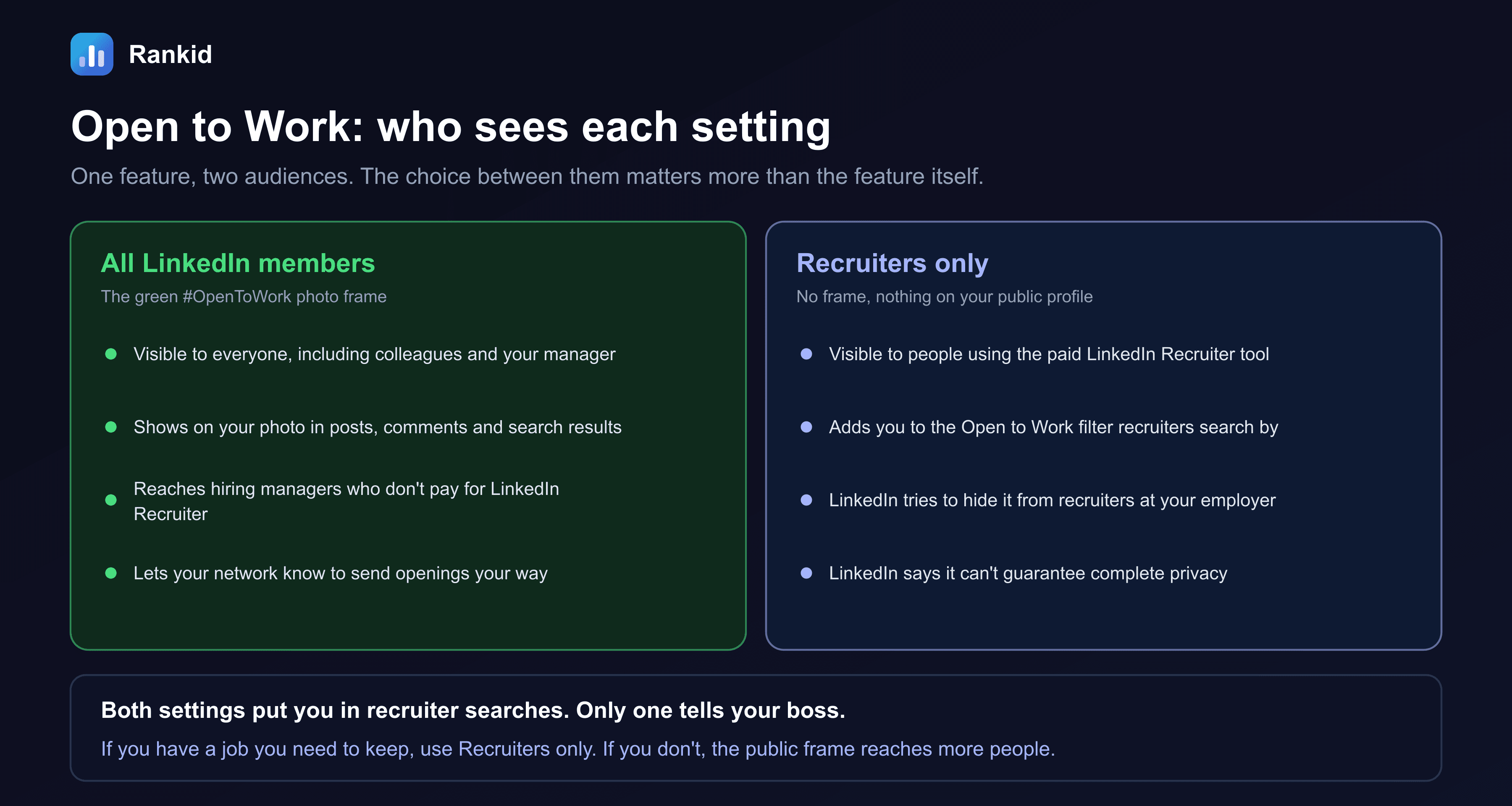
- All LinkedIn members. Adds the green frame. Everyone sees it, wherever your photo appears: your profile, your posts, your comments, search results.
- Recruiters only. No frame and no visible change to your profile. The signal is shown to people using LinkedIn Recruiter, the paid search tool most in-house and agency recruiters work in.
Both settings put you in the Open to Work filter that recruiters search by. That is the detail most of the debate skips. When someone says "never use Open to Work," they almost always mean the green frame.
Does it hurt your chances? What the data says
The case that it helps:
- LinkedIn says members who turn on Open to Work are about twice as likely to receive a recruiter message.
- LinkedIn says adding the public frame raises that likelihood by a further 40%.
- In a survey by the job search company Teal, only 9% of recruiters and hiring managers said they view the banner negatively.
- In a LinkedIn poll, 70% of respondents said the banner is a good thing, 7% said it is bad and 18% were neutral.
The reason is practical. Recruiters are measured on replies. A candidate who has said they're available is more likely to answer, so many recruiters filter for them first. See how to get found by recruiters on LinkedIn.
The case that it hurts:
- In 2024, former Google recruiter Nolan Church told CNBC the banner "is the biggest red flag," arguing that "the best people are not looking for jobs."
- Some executive career coaches advise against the public frame, saying a share of hiring managers read it as desperation.
Both can be true. Most recruiters don't mind, and a few do. The figures above come from LinkedIn, which has an interest in the feature being used, and from surveys of what recruiters say, which isn't always what they do. So the sensible reading is: the frame helps on average, and the risk sits mostly at senior levels and with employed candidates.
The #Desperate banner
Can your employer see it?
With the public frame, yes. Assume your manager will know within a week.
With Recruiters only, probably not, but not certainly. LinkedIn's own help page says it takes steps to stop recruiters at your current company from seeing the signal, and that it can't guarantee complete privacy. There are three gaps:
- Your profile has to be accurate. LinkedIn works out who to hide you from using the job marked as current on your profile. If that entry is missing, out of date, or attached to the wrong company page, the filter has nothing to work with.
- Outside recruiters aren't covered. An agency your employer hires, or a recruiter at a parent company or subsidiary listed separately, may still see you.
- People talk. A recruiter who knows your manager can mention it.
If being found out would put your job at risk, treat Recruiters only as low risk, not no risk. Other quiet methods are in career cushioning.
Which setting fits your situation?
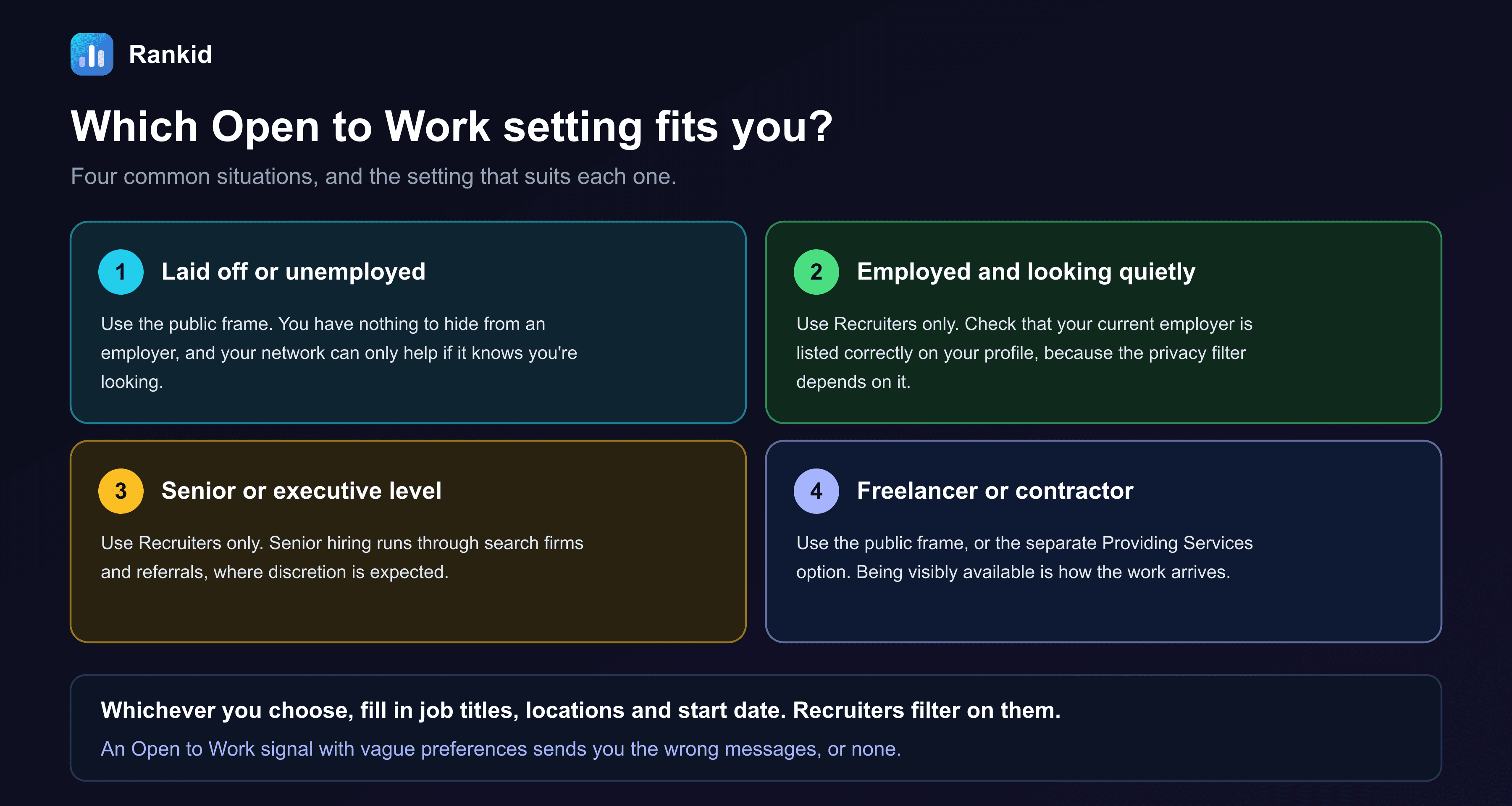
- Laid off or unemployed.Use the public frame. Your contacts can't send you openings if they don't know you're looking, and many jobs are filled that way. See the hidden job market.
- Employed and looking quietly. Use Recruiters only, and check your current employer is listed correctly first.
- Senior or executive. Use Recruiters only. Search firms expect discretion, and this is where the minority view against the frame is strongest.
- Freelancer or contractor.Use the public frame or LinkedIn's separate Providing Services option. Being visibly available is the point.
- Returning after a gap, or over 50.The public frame is fine. Pair it with a current headline and recent activity so the profile doesn't look dormant. See job searching over 50.
How to turn Open to Work on, and off
Open the setting
Fill in your preferences
Choose who sees it
Review it every few weeks
To remove it, select the pencil icon on the Open to Work box on your profile and choose Delete from profile. To lose the frame but stay in recruiter searches, change the visibility to Recruiters only. Turn it off when you accept a job, or you'll keep getting messages in your first week.
Does it look desperate? What recruiters react to
When recruiters say a profile looks desperate, the frame is rarely the reason. It's what surrounds it.
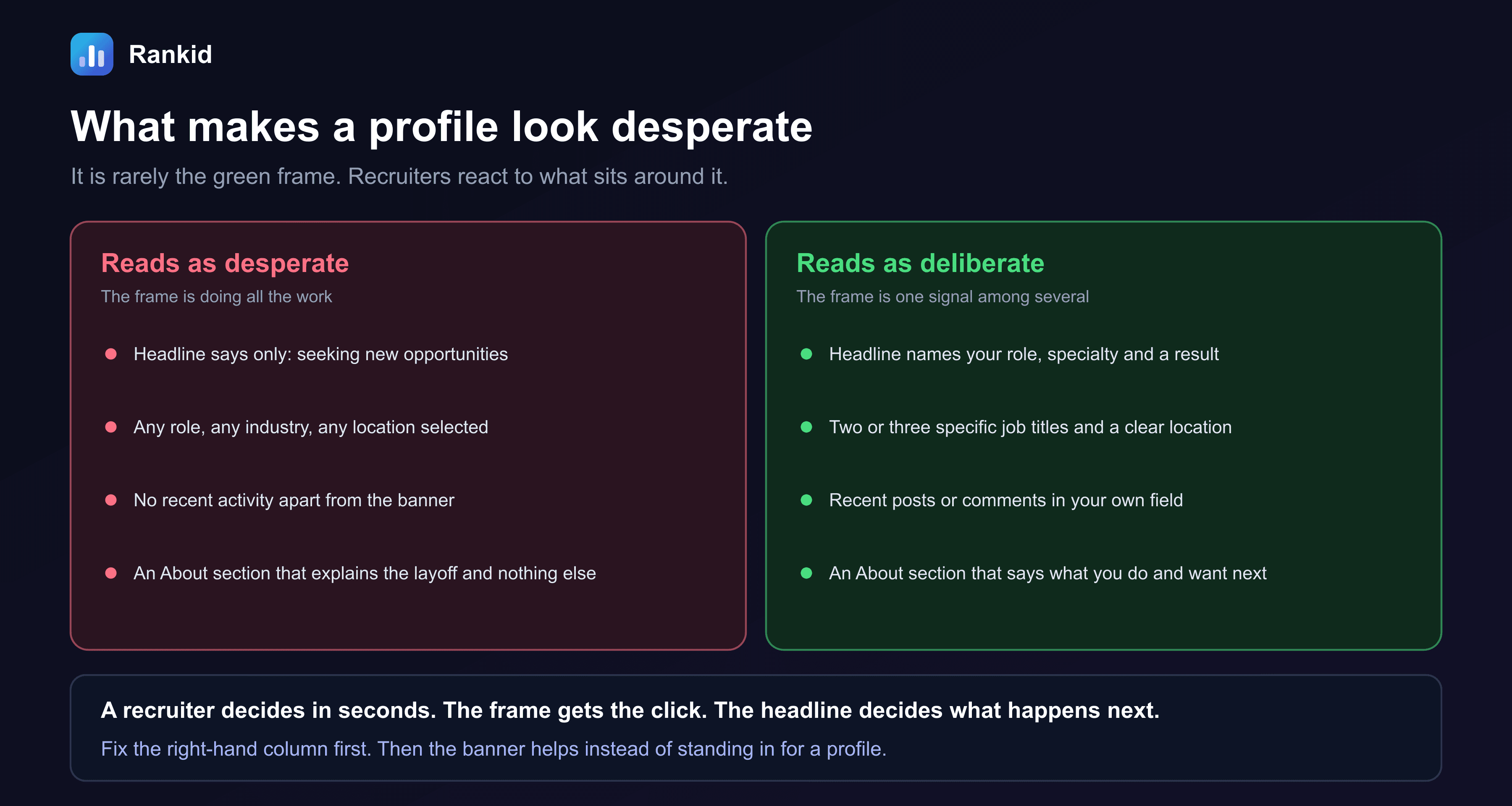
- Headline."Seeking new opportunities" tells a recruiter nothing they can search for. "Supply chain analyst | demand forecasting | cut stockouts 18%" does.
- Preferences.Two or three job titles and a clear location. Selecting everything suggests you'll take anything.
- Activity.A comment or post in your field every week or two shows you're current.
- About section.What you do and what you want next. A line about a layoff is fine. It shouldn't be the whole section.
One more thing about leverage. Some people worry the frame weakens their position on pay. Recruiters already assume most candidates they speak to are open to moving. Your leverage comes from what you can do and what other offers you hold, not from appearing uninterested. See how to negotiate salary.
A side effect: scams
What matters more than the banner
The setting gets a recruiter to your profile. It doesn't get you the interview. That depends on whether your profile and resume match the job they're filling.
- Reply quickly. A recruiter working a role contacts many people. The first qualified replies get the calls. See how to respond to a recruiter.
- Keep your resume ready. The first thing a recruiter asks for is a current resume, and it should agree with your profile on titles and dates.
- Tailor it to the role.A recruiter's message usually includes the job description. Use it. See tailoring your resume.
Ready for the recruiter who messages you?
When Open to Work does its job, the next request is your resume. Paste it with the job description and Rankid gives you a free 0-100 match score, with the exact requirements you meet and miss. No signup required.
Check your match score freeFor recruiters and hiring managers
- Don't screen people out for the frame. It says someone is available. It says nothing about how good they are, and in a market with long searches, capable people are out of work for months.
- Don't screen people in for it either.Open to Work candidates reply more often, which makes them easy to source. It doesn't make them a better match.
- Assess against the job. Compare each candidate with the same written requirements, whatever their profile photo looks like. See candidate sourcing and resume screening criteria.
Judge the resume, not the profile photo
Rankid scores every applicant against your job description on a consistent 0-100 scale and shows the exact requirements each one matched and missed. First 5 resumes free, no signup.
Try bulk screening freeFrequently asked questions
What does Open to Work mean on LinkedIn?
Open to Work is a LinkedIn setting that signals you are available for new jobs. You list the job titles, locations and work types you want, then choose who sees it: all LinkedIn members, which adds a green #OpenToWork frame to your photo, or recruiters only, which shows nothing on your public profile.
Does the Open to Work banner hurt your chances?
For most people, no. LinkedIn says members who turn the feature on are about twice as likely to get a recruiter message, and in a Teal survey only 9% of recruiters and hiring managers said they view the banner negatively. A minority of recruiters do read the public frame as a sign of desperation, mainly for senior roles.
Can my employer see that I'm Open to Work?
With the public setting, yes: anyone can see the green frame. With Recruiters only, LinkedIn takes steps to hide the signal from recruiters at your current company, but it says it can't guarantee complete privacy. The filter relies on your current employer being listed correctly on your profile, and it doesn't cover outside agencies your employer uses.
Should I use Recruiters only or All LinkedIn members?
If you have a job you need to keep, use Recruiters only. If you are unemployed, were laid off, or freelance, the public frame reaches more people, including hiring managers and contacts who don't use LinkedIn Recruiter. For senior and executive roles, Recruiters only is the more common choice.
Does Open to Work look desperate?
On its own, rarely. What reads as desperate is a profile where the frame is the only signal: a headline that says only 'seeking new opportunities', every role and location selected, and no recent activity. A specific headline and clear job preferences make the same frame look deliberate.
How do I turn on Open to Work on LinkedIn?
Go to your profile, select the 'Open to' button under your name, and choose 'Finding a new job'. Add the job titles, location types, locations, start date and employment types you want. Then choose who can see it, All LinkedIn members or Recruiters only, and save.
How do I remove the Open to Work banner?
Go to your profile and select the pencil icon on the Open to Work box under your name. Choose 'Delete from profile' to switch the feature off entirely, or change the visibility to Recruiters only to remove the green frame while staying visible in recruiter searches.
Do recruiters actually search for Open to Work candidates?
Yes. LinkedIn Recruiter has an Open to Work filter, and many recruiters start there because those candidates are more likely to reply. Both visibility settings place you in that filter. The public frame is not required for recruiters to find you.
Key takeaways
- Open to Work is a LinkedIn setting with two visibility options: All LinkedIn members, which adds the green #OpenToWork frame, and Recruiters only, which shows nothing publicly.
- Both options place you in the Open to Work filter recruiters search by. The green frame is not required to be found.
- LinkedIn says turning the feature on makes you about twice as likely to get a recruiter message. In a Teal survey, 9% of recruiters and hiring managers viewed the banner negatively.
- A minority of recruiters read the public frame as desperation, mainly at senior levels.
- Recruiters only is not fully private. LinkedIn says it can't guarantee your employer won't see it, and the filter depends on your current job being listed correctly.
- Unemployed or freelance: use the public frame. Employed or senior: use Recruiters only.
- What looks desperate is a vague headline and unfocused preferences, not the frame. Fix those first, and have a tailored resume ready for the reply.
Frequently asked questions
What does Open to Work mean on LinkedIn?
Open to Work is a LinkedIn setting that signals you are available for new jobs. You list the job titles, locations and work types you want, then choose who sees it: all LinkedIn members, which adds a green #OpenToWork frame to your photo, or recruiters only, which shows nothing on your public profile.
Does the Open to Work banner hurt your chances?
For most people, no. LinkedIn says members who turn the feature on are about twice as likely to get a recruiter message, and in a Teal survey only 9% of recruiters and hiring managers said they view the banner negatively. A minority of recruiters do read the public frame as a sign of desperation, mainly for senior roles.
Can my employer see that I'm Open to Work?
With the public setting, yes: anyone can see the green frame. With Recruiters only, LinkedIn takes steps to hide the signal from recruiters at your current company, but it says it can't guarantee complete privacy. The filter relies on your current employer being listed correctly on your profile, and it doesn't cover outside agencies your employer uses.
Should I use Recruiters only or All LinkedIn members?
If you have a job you need to keep, use Recruiters only. If you are unemployed, were laid off, or freelance, the public frame reaches more people, including hiring managers and contacts who don't use LinkedIn Recruiter. For senior and executive roles, Recruiters only is the more common choice.
Does Open to Work look desperate?
On its own, rarely. What reads as desperate is a profile where the frame is the only signal: a headline that says only 'seeking new opportunities', every role and location selected, and no recent activity. A specific headline and clear job preferences make the same frame look deliberate.
How do I turn on Open to Work on LinkedIn?
Go to your profile, select the 'Open to' button under your name, and choose 'Finding a new job'. Add the job titles, location types, locations, start date and employment types you want. Then choose who can see it, All LinkedIn members or Recruiters only, and save.
How do I remove the Open to Work banner?
Go to your profile and select the pencil icon on the Open to Work box under your name. Choose 'Delete from profile' to switch the feature off entirely, or change the visibility to Recruiters only to remove the green frame while staying visible in recruiter searches.
Do recruiters actually search for Open to Work candidates?
Yes. LinkedIn Recruiter has an Open to Work filter, and many recruiters start there because those candidates are more likely to reply. Both visibility settings place you in that filter. The public frame is not required for recruiters to find you.