Recruitment Automation: What to Automate, What to Never Automate (2026)
Search recruitment automation and you will get fifteen listicles of fifteen tools, which is a useful answer to a question almost nobody is actually asking. The real question is not which platform to buy. It is which parts of your hiring process deserve to be handed to software at all, and which parts will quietly cost you good candidates the moment you automate them. Those two categories are easy to tell apart once you know the test.
Quick answer
What is recruitment automation?
Recruitment automation is the use of software to perform the high-volume, repetitive steps in hiring without a recruiter doing each one by hand. In practice that covers parsing and de-duplicating incoming resumes, evaluating each applicant against the job description, ranking them, sending acknowledgements, booking interview slots, chasing feedback and pushing status updates. You will see it called recruiting automation, recruitment process automation or recruiting workflow automation, and the differences between those labels are marketing rather than substance.
What matters far more is the boundary that most definitions blur. Automating the work of hiring is not the same as automating the decisions of hiring. Sorting four hundred applicants into a defensible order is work. Deciding that the bottom three hundred never hear from you again is a decision. Vendors tend to sell both under one word, and teams that accept that framing end up with a system that is fast, cheap and quietly rejecting people nobody ever looked at.
The one-sentence version
What to automate, and what to never automate
You do not need a philosophy of artificial intelligence to make this call. You need two questions about each step in your process: how many times does it happen per requisition, and what does it cost you if it goes wrong? Repetition tells you how much there is to gain. Reversibility tells you how much there is to lose.
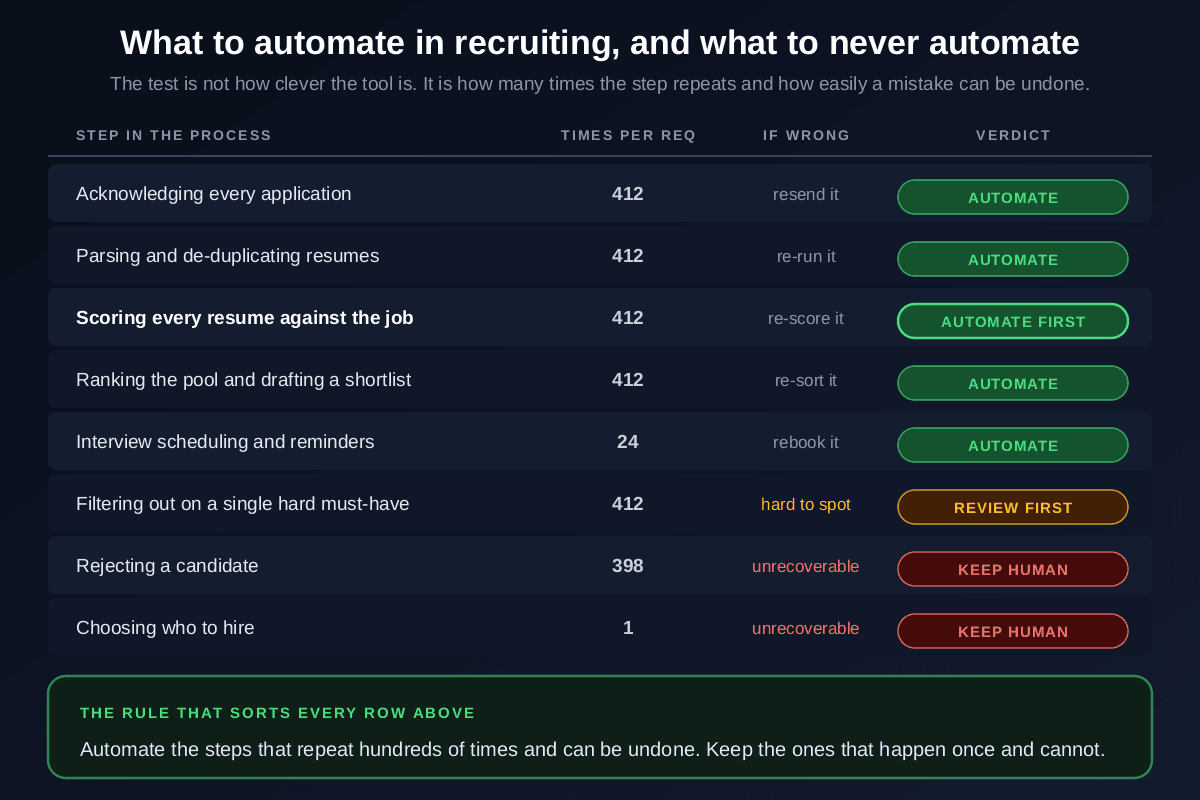
Read down the verdict column and the pattern is consistent. Everything marked automate happens hundreds of times per role and can be redone in seconds if the result looks wrong: re-run the parse, re-score the batch, re-sort the ranking, rebook the call. Nothing is lost by trying. Everything marked keep human happens rarely, is aimed at one specific person, and cannot be walked back. A candidate who receives an automated rejection at 2am does not come back when you realise the criteria were badly written.
The middle row is the one worth arguing about. Hard must-have filters, the ones that remove anyone without a specific certification or visa status, feel like obvious automation candidates and often are. The catch is that a wrong filter is invisible: the people it removes never appear in any list you look at, so nothing ever tells you it misfired. If you use hard filters, review what they excluded at least once per requisition rather than trusting them permanently. Our guide to resume screening criteria covers how to tell a genuine must-have from a preference that crept into the posting.
Where the hours actually are
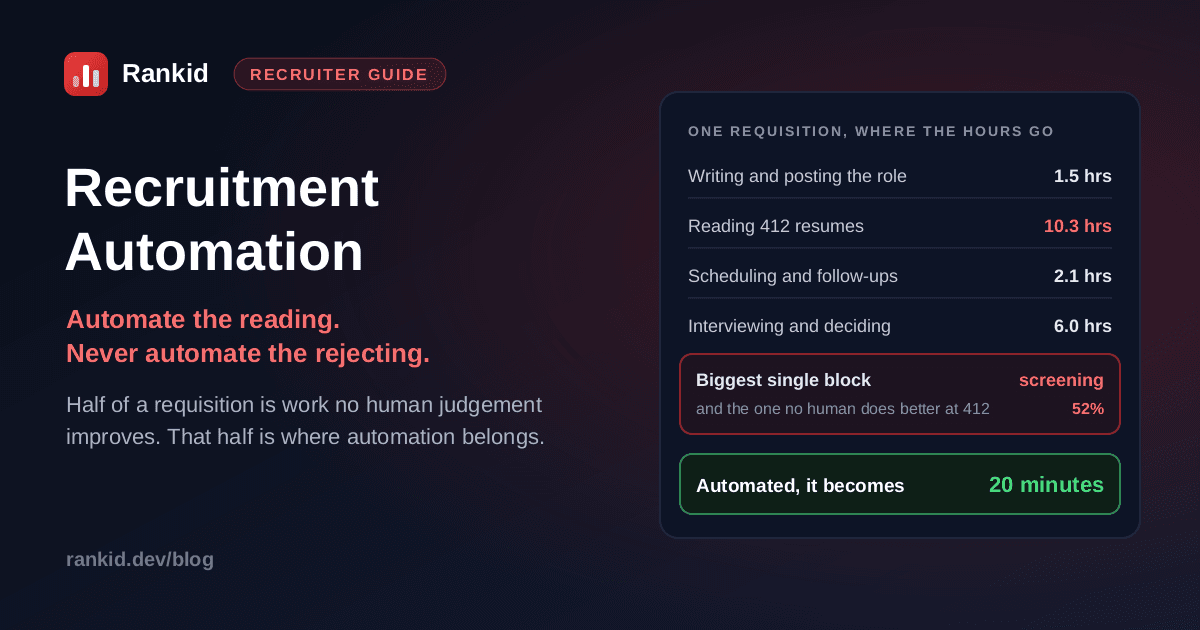
Here is why the order you automate in matters more than the tools you pick. Take an ordinary requisition with 412 applicants, which is unremarkable for an advertised role in 2026. The recruiter time on it breaks down roughly like this: an hour and a half writing and posting, about ten hours reading resumes at ninety seconds each, two hours of scheduling and follow-ups, and six hours of interviewing and decision-making. Call it twenty hours.
Screening is more than half of that, and it is the only block that grows directly with applicant volume. Double the applicants and the interviews stay at six hours while the reading goes to twenty. This is the same arithmetic that makes screening the largest hidden line in cost per hire and the reason the reading never finishes in high-volume recruiting. It also explains a common and demoralising outcome: teams that automate their job post templates, their acknowledgement emails and their scheduling links, then discover their week feels exactly the same, because they automated three hours and left the ten alone.
Recruitment automation in the order that pays
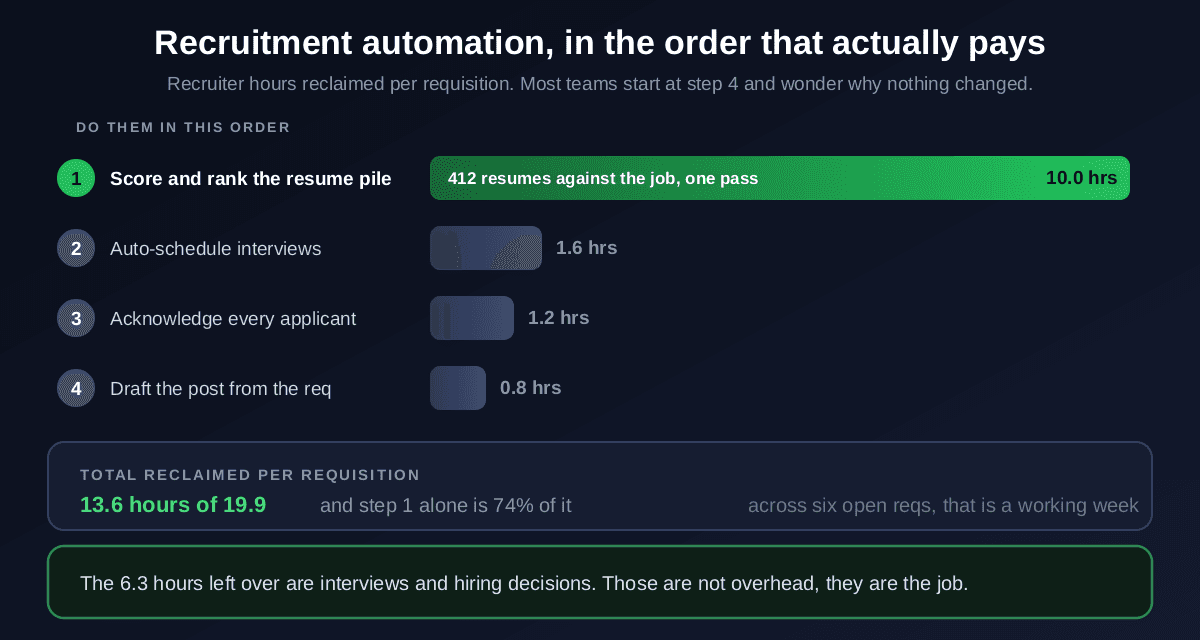
Sequence the work by hours reclaimed, not by how easy the integration looks. Here is the order that actually moves a recruiter's week.
Score and rank the whole applicant pool against the job
This is the step that pays for the entire programme, and it is the one most teams reach last. Upload the batch, paste the job description once, and let every resume be parsed and rated against the actual requirements: skills, keywords, seniority and relevant experience. What comes back is a ranked list with the matched and missing requirements attached to each candidate, which is both faster than reading and more consistent, because applicant 380 gets measured against the same bar as applicant 3. The mechanics are covered in how to screen resumes in bulk, and the per-candidate reasoning in bulk resume analysis.
Automate interview scheduling and reminders
Self-service booking links, calendar sync and automatic reminders remove a genuinely irritating two hours per requisition and, more importantly, remove days of latency. Scheduling delay is one of the quietest causes of candidate drop-off, because a strong candidate waiting four days for a slot is a strong candidate accepting someone else's offer.
Automate acknowledgements and status updates
Every applicant gets a confirmation, and everyone still in play gets told where they stand at each stage. This reclaims little time by itself, but it is the highest-leverage change you can make to candidate experience, because the complaint is almost never that people were rejected, it is that they were ignored. Automate the acknowledgement and the update; write the actual rejection yourself.
Automate job post drafting from the requisition
Generating a first draft from the approved requisition saves under an hour and is the step most teams start with. It is worth doing, but treat it as a finishing touch rather than a strategy, and always edit the output: a vague, generated posting degrades every downstream evaluation, because the job description is the standard everything else is measured against. See how to write a job description for what the draft needs to contain.
Automate the ten-hour step first
Upload your applicant batch and paste the job description. Rankid scores every candidate 0 to 100 by fit, with the skills and keywords each one matches and misses, so the longest block of your week becomes a ranked shortlist in minutes. Up to 200 resumes per batch, and your first 5 are free with no signup.
Automate resume screening freeRecruitment automation vs your ATS: what is the difference?
These get conflated constantly, and the distinction is simple once stated. An applicant tracking system is a system of record. It stores candidates, tracks what stage each one is in, holds your notes and keeps the process auditable. Recruitment automation is a layer of work getting done: evaluating, ranking, messaging, booking.
Most ATS platforms do include automation features, and for messaging and workflow triggers they are often perfectly good. Where they tend to be weak is evaluation. The typical built-in screening feature is a keyword filter, which is a blunt instrument: it matches strings rather than meaning, so a candidate who wrote “managed the data warehouse” can be filtered out of a role asking for “ETL experience” despite being an obvious fit. That failure mode is explained in detail in resume parsing.
The practical setup for most teams is to keep the ATS as the system of record and add scoring on top of it for each requisition, because the two are solving different problems and neither replaces the other. If you also maintain a talent pipeline of past applicants, the same scoring layer is what lets you re-rank that stored pool against each new role instead of letting it go stale.
What recruitment automation software should actually do
When you evaluate recruitment automation tools, most of the feature list is noise. Four capabilities determine whether the thing earns its cost:
- Evaluate meaning, not just strings. The tool should understand that a skill described in different words is still that skill. Anything doing plain keyword matching will hand you a shortlist optimised for people who happened to mirror your phrasing, which is a different population from people who can do the job.
- Handle the whole batch in one pass. Per-candidate review is what you are trying to escape. If the workflow is one resume at a time, you have bought a nicer interface, not automation.
- Show its reasoning. Every score needs the matched and missing requirements attached. A ranking you cannot explain is a ranking you cannot defend to a hiring manager, and increasingly one you cannot defend to a regulator either.
- Rank without rejecting. The system should order the pool and leave the cut to you. Treat any tool that auto-rejects by default as a liability, and turn that behaviour off before you turn anything else on.
Notice what is missing from that list: number of integrations, breadth of modules, and whether the marketing says AI. Buy against the bottleneck you measured, not the platform with the longest feature page. If you have not yet identified which stage is consuming your hours, that diagnosis is the work, and no purchase substitutes for it.
The four ways recruiting automation goes wrong
- Automating the cheap steps first. Templates and email triggers are easy wins worth roughly three hours. Screening is worth ten. Teams routinely do the easy three, declare the process automated, and keep drowning.
- Letting automation reject. The single most damaging setting in the category. A wrong ranking is free to fix; a wrong rejection is permanent and invisible, which is why qualified candidates get auto-rejected without anyone on either side finding out.
- Feeding it a vague job description. Automation measures candidates against whatever standard you give it. A posting with four generic bullet points produces a ranking with no real information in it, and the tool gets blamed for the input.
- Never auditing the output. Automated screening should be checked the way a human screen is checked. Compare pass rates across groups, spot-read the middle band, and confirm the top of the ranking still looks like people you would interview. Our guide to adverse impact covers the four-fifths rule calculation that makes this concrete.
A note on the rules, because they are tightening
How to tell whether the automation worked
Measure the outcome, not the activity. Number of automated actions is a vanity metric that every platform will happily show you. These four tell you the truth:
- Recruiter hours per requisition. The headline number. If it has not moved, you automated the wrong step, whatever the dashboard says.
- Share of applicants actually evaluated. Before automation this is often well under half, because the reading runs out before the pile does. Getting it to 100 percent is the real quality gain hiding inside the speed gain.
- Time from application to first response. The candidate-visible measure, and the one that moves offer acceptance. Days, not weeks.
- Shortlist-to-interview conversion. A quality check. If your automated shortlists produce interviews at a lower rate than your manual ones did, the criteria need work, not the tool.
That second metric deserves emphasis, because it is the one people miss. The usual pitch for automation is speed, but the more valuable effect is coverage: the strong candidate sitting at position 340 in the pile was never rejected on merit, they were simply never reached. Evaluating everyone consistently is the part that changes who you hire, and it is covered from the shortlisting side in how to shortlist candidates.
Key takeaways
- Recruitment automation should change how much you can evaluate, not who decides who gets hired.
- Apply one test to every step: how often does it repeat, and can a mistake be undone?
- Automate screening first. It is over half the recruiter hours on a requisition and everything else combined is worth two or three.
- Never automate rejection or the final hire decision, and review anything a hard filter removes.
- An ATS is the system of record; automation is the work getting done. Most teams need both.
- Measure recruiter hours per req and share of applicants actually evaluated, not the count of automated actions.
- Rankid scores up to 200 resumes per batch against one job description, and your first 5 are free with no signup.
Bottom line: recruitment automation is not a product category you buy into, it is a decision you make step by step about where software genuinely beats a person and where it very much does not. Software is better than any recruiter at applying the same standard to the four hundredth resume as to the first. It is worse than any recruiter at deciding what a borderline candidate deserves. Build the process along that line and you get speed without giving up judgement. Automate the screening step on your next requisition and see what the other ten hours of your week were hiding.
Frequently asked questions
What is recruitment automation?
Recruitment automation is the use of software to carry out the repetitive, high-volume steps of hiring without a recruiter doing each one by hand: parsing and de-duplicating resumes, scoring every applicant against the job description, ranking a shortlist, sending acknowledgements, booking interviews and pushing status updates. It is not the same as automating hiring decisions. The useful definition is narrower than most vendor pages suggest: automation handles the throughput work that repeats hundreds of times per requisition, and a person still makes every call that affects whether someone gets the job.
What parts of recruiting should you automate first?
Start with resume screening, because it is almost always the single largest block of recruiter time and the one that scales worst. A requisition with 412 applicants is roughly 10 hours of reading at 90 seconds each, which is over half the total recruiter time on that role. Automating scoring and ranking turns that into minutes. Scheduling, acknowledgements and status updates are worth automating next, but together they usually reclaim only two or three hours, so doing them first is why many teams automate a lot and feel no difference.
What should never be automated in hiring?
Never automate a decision that cannot be undone and that the candidate cannot appeal. In practice that means three things: automatic rejection, the final hire decision, and any hard filter that silently removes people from the pool without a human ever seeing them. The reason is asymmetry. If an automated ranking is wrong you simply re-score and the candidate is still there; if an automated rejection is wrong the person is gone and neither of you will ever know. Rank with software, decide with a person.
What is the difference between recruitment automation and an ATS?
An applicant tracking system is a system of record: it stores candidates, tracks which stage they are in and keeps your hiring compliant and auditable. Recruitment automation is a layer of work that gets done: evaluating, ranking, messaging and scheduling. Most ATS platforms include some automation, usually keyword filters and email triggers, but keyword filters are a crude form of evaluation that miss candidates who described the same skill in different words. The common setup is to keep the ATS as the record and add a scoring tool that ranks each batch of applicants against the specific job description.
How much time does recruitment automation actually save?
For a typical requisition of around 400 applicants, automating screening, scheduling, acknowledgements and job post drafting reclaims roughly 13 to 14 recruiter hours out of about 20, and around three quarters of that saving comes from screening alone. Across six open requisitions that is close to a full working week. The number scales with applicant volume, so the higher your applicant-to-hire ratio, the larger the return. The hours that remain, interviews and hiring decisions, are the ones you actually want a recruiter spending time on.
Does recruitment automation reduce bias or increase it?
It can do either, and the deciding factor is whether it is used to rank or to reject. Applied to ranking, automation is usually more consistent than a tired human, because applicant 380 is evaluated against the same criteria as applicant 3, which is exactly what stops happening around hour six of manual screening. Applied to rejection, it scales any flaw in the criteria across the entire pool at once. Audit it the same way you would audit a human screen: check pass rates by group against the four-fifths rule, keep the reasoning visible for every score, and never let the system remove anyone without review.
What is the best recruiting automation tool?
There is no single best tool, because recruiting automation is not one job. Match the tool to the bottleneck you actually have. If applications outnumber your reading time, you need bulk scoring and ranking against the job description. If candidates go dark between stages, you need messaging and scheduling automation. If your data is scattered, you need the ATS fixed first. Buying a broad platform before you know which stage is losing you the hours is the most common and most expensive mistake in this category.
Is automated resume screening legal?
It is legal in most jurisdictions, but a growing number regulate it specifically, and the rules target automated decisions rather than automated assistance. New York City's Local Law 144 requires annual bias audits and candidate notice for automated employment decision tools, Illinois regulates AI use in video interviews, and the EU AI Act classifies recruitment systems as high risk with transparency and human oversight obligations. Keeping a human as the decision-maker, retaining the reasoning behind each score and running regular adverse impact checks puts you on the right side of nearly all of these frameworks.